
Database Engineering Fundamentals
Personal learning path — chapter by chapter
Skeleton study guide for the Database Engineering Fundamentals course. Mark progress as you go. Chapter notes grow over time.
Docs site: ardavanshamroshan.github.io/database-engineering-fundumentals
Language: English · فارسی
Cheatsheets: PostgreSQL · MySQL · SQLite · Redis · MongoDB · Cassandra · ScyllaDB
Progress
| Status | Count |
|---|---|
| Total chapters | 17 |
| Done | 0 |
| In progress | — |
Marks: [ ] not started · [~] in progress · [x] done
How to use
- Study one chapter at a time (order below).
- Tick the checkbox when that chapter is done.
- Add notes under the chapter as you learn.
- Skip 01 / 15 / 16 / 17 if you only want core engineering topics; they stay listed for completeness.
Table of contents
Part 0 — Meta
Part I — Foundations
- 02 — ACID
- 03 — Understanding Database Internals
- 04 — Database Indexing
- 05 — B-Tree vs B+Tree
- 05.1 — Introduction and Learning Path
- 05.2 — Full Table Scans
- 05.3 — The Original B-Tree
- 05.4 — How B-Trees Improve Performance
- 05.5 — Limitations of the Classic B-Tree
- 05.6 — B+Tree Structure and Range Queries
- 05.7 — Production DBMS Considerations
- 05.8 — Storage Costs: PostgreSQL vs MySQL InnoDB
- 05.9 — Summary and Self-Check
Part II — Scale & Distribution
- 06 — Database Partitioning
- 06.1 — Introduction and Learning Path (Lesson 001)
- 06.2 — What Is Partitioning? (Lesson 002)
- 06.3 — Vertical vs Horizontal Partitioning (Lesson 003)
- 06.4 — Partitioning Types (Lesson 004)
- 06.5 — Partitioning vs Sharding (Lesson 005)
- 06.6 — Preparing PostgreSQL, the Database, Table, and Indexes (Lesson 006)
- 06.7 — Execute Multiple Queries on the Original Table (Lesson 007)
- 06.8 — Create and Attach Partitioned Tables (Lesson 008)
- 06.9 — Populate the Partitions and Create Indexes (Lesson 009)
- 06.10 — Class Project: Queries, Pruning, and Partition Sizes (Lesson 010)
- 06.11 — Advantages of Partitioning (Lesson 011)
- 06.12 — Disadvantages and Design Constraints (Lesson 012)
- 06.13 — Summary and Self-Check (Lesson 013)
- 06.14 — Automate Partitioning in PostgreSQL (Lesson 014)
- 07 — Database Sharding
- 08 — Concurrency Control
- 09 — Database Replication
Part III — Systems & Engines
Part IV — Security
Part V — Extra
Chapters
01 — Course Updates
- Status:
[ ] - Summary: Course changelog and material updates.
- Focus: Stay aligned with latest course content.
- Notes: (later)
02 — ACID
- Status:
[ ] - Summary: Four transaction properties: Atomicity, Consistency, Isolation, Durability.
- Focus: Transaction guarantees in relational systems.
- Notes:
ACID: Atomicity, Consistency, Isolation, Durability.
In relational database systems, ACID ensures integrity and consistency of the database.
What is a Transaction?
A transaction is:
- A group of queries executed as one unit
- Treated as a single, indivisible task (unit of work)
- Example — account transfer:
SELECT: check that the source account has enough moneyUPDATE: decrease balance on the first accountUPDATE: increase balance on the second account
START TRANSACTION;
SELECT * FROM account WHERE account_id = 1;
-- IF balance < 100 THEN ROLLBACK;
UPDATE account SET balance = balance - 100 WHERE account_id = 1;
UPDATE account SET balance = balance + 100 WHERE account_id = 2;
COMMIT;If the account does not have enough money, roll back — database stays in the previous state.
If it does, commit — database moves to the new state.
To allow undo when needed, changes are first written to memory; only after confirmation are they committed to disk.
Atomicity
A transaction is an atomic unit of work that either succeeds or fails as a whole. All queries in a transaction must succeed or fail together.
Lab: prove Atomicity with an unfinished transaction (PostgreSQL)
Goal: Show that an uncommitted change does not become permanent. If the session ends without COMMIT, PostgreSQL rolls the transaction back — all-or-nothing.
What we expect
| Moment | products.inventory |
|---|---|
Before BEGIN | 10 |
Inside open transaction after UPDATE | 0 (visible only in this session) |
After disconnect without COMMIT | 10 again (rollback) |
Why this proves Atomicity
- Inside the transaction you see inventory go to
0. - You never call
COMMIT. - Exiting
psqlaborts the open transaction → automaticROLLBACK. - The unit of work did not complete → none of its changes survive.
- That is Atomicity: succeed entirely, or leave the database as if the work never ran.
Note: You also touch Durability indirectly: only committed work is durable. Uncommitted work must disappear on abort.
1) Setup
CREATE DATABASE app;
\c app

CREATE TABLE products (
  id SERIAL PRIMARY KEY,
  name TEXT,
  price FLOAT,
  inventory INTEGER
);

CREATE TABLE sales (
  id SERIAL PRIMARY KEY,
  product_id INTEGER,
  price FLOAT,
  quantity INTEGER
);

INSERT INTO products (id, name, price, inventory)
VALUES (1, 'Phone', 999.99, 10);

SELECT * FROM products;
-- id=1, name=Phone, price=999.99, inventory=102) Start a transaction and change inventory (do not commit)
BEGIN;

UPDATE products SET inventory = inventory - 10;

SELECT * FROM products;
-- inventory is 0 in this session3) Leave without COMMIT
Exit the client (e.g. quit psql) while the transaction is still open. PostgreSQL aborts it.
4) Reconnect and check
\c app
SELECT * FROM products;
-- inventory is 10 againResult: The UPDATE looked real inside the transaction, but after abort the database returned to the previous valid state. Atomic unit = all or nothing.
Try next (optional): Repeat the same steps, but run COMMIT; before exiting. After reconnect, inventory should stay 0.
Consistency
A transaction must bring the database from one valid state to another.
- Consistency in data
- Defined by the user
- Referential integrity (foreign keys)
- Related to atomicity of the transaction
- Related to isolation of the transaction
- Consistency in reads
- If a transaction committed a change, will a new transaction immediately see it?
- Affects the system as a whole
- Both relational and NoSQL databases deal with this
- Eventual consistency
Isolation
Isolation Level controls how concurrent transactions see each other’s data.
PostgreSQL uses MVCC (Multi-Version Concurrency Control): readers usually do not block writers, and writers usually do not block readers. Isolation still decides which version of a row you see.
Simple case: one transaction runs an UPDATE, another runs a SELECT on the same rows. The isolation level decides whether the reader sees the old row version, waits, or sees a snapshot fixed at transaction start.
Question: can my in-flight transaction see changes made by other transactions?
Transaction 1:
SELECT id, quantity FROM products WHERE id = 1;
SELECT SUM(quantity) FROM products;Transaction 2:
UPDATE products SET quantity = quantity - 1 WHERE id = 1;If transactions are not isolated, results can be wrong.
Core anomalies
Dirty read — Transaction A changes data but has not committed yet. Transaction B’s SELECT reads those pending changes. If A later rolls back, B already used invalid data.
Non-repeatable read — You read a row, another transaction commits an update/delete to that row, your next SELECT sees a different value (or no row).
Phantom read — While Transaction A runs SELECTs, another transaction inserts (or deletes) rows that match A’s predicate. A’s later SELECT sees a different set of rows — new “ghost” rows appear (or disappear).
| Anomaly | What changed |
|---|---|
| Dirty read | You read uncommitted changes from another transaction |
| Non-repeatable read | An existing row you already read was updated (or deleted) |
| Phantom read | The set of rows matching your query grew/shrank |
Isolation levels in PostgreSQL (overview)
| Level | PostgreSQL behavior | Dirty | Non-repeatable | Phantom |
|---|---|---|---|---|
| Read Uncommitted | Accepted, but behaves like Read Committed (no real dirty reads) | 🟢 | 🔴 | 🔴 |
| Read Committed | Default. Each statement sees only data committed before that statement started | 🟢 | 🔴 | 🔴 |
| Repeatable Read | Snapshot of the DB as of transaction start; stable reads; phantoms normally blocked | 🟢 | 🟢 | 🟢 |
| Serializable | Snapshot + conflict detection (SSI); may abort a transaction with a serialization failure | 🟢 | 🟢 | 🟢 |
PostgreSQL has no separate
SNAPSHOTisolation level name. Repeatable Read already gives snapshot isolation. Serializable is stronger (Serializable Snapshot Isolation).
Setup for PostgreSQL labs
Open two psql sessions connected to app (reuse the Atomicity lab DB, or create it). Run setup once:
CREATE DATABASE app;          -- skip if it already exists
\c app

DROP TABLE IF EXISTS test_table;
CREATE TABLE test_table (
  id SERIAL PRIMARY KEY,
  field1 INT,
  field2 INT,
  field3 INT
);

INSERT INTO test_table (field1, field2, field3) VALUES
  (1, 2, 3),
  (1, 2, 3),
  (1, 2, 3),
(1, 2, 3);Use pg_sleep(10) so you have time to switch sessions (instead of a manual pause only).
1) Read Uncommitted (same as Read Committed in PostgreSQL)
In the SQL standard this is the weakest level and can allow dirty reads. In PostgreSQL, READ UNCOMMITTED is treated like READ COMMITTED — you still cannot see uncommitted data from other sessions.
Session 1:
BEGIN;
UPDATE test_table SET field1 = 2;
SELECT pg_sleep(10);
ROLLBACK;Session 2 (run while Session 1 is sleeping):
SET TRANSACTION ISOLATION LEVEL READ UNCOMMITTED;
SELECT * FROM test_table;You still see the old committed values (field1 = 1), not 2. No dirty read. That is intentional PostgreSQL behavior.
2) Read Committed (default)
Each statement sees only rows committed before that statement began. You never see dirty data. Across statements in the same transaction, another session’s committed updates can still change what you see → non-repeatable / phantom possible.
Demonstrate non-repeatable read
Session 1:
BEGIN;  -- default = READ COMMITTED
SELECT * FROM test_table WHERE id = 1;
SELECT pg_sleep(10);
SELECT * FROM test_table WHERE id = 1;  -- may differ after Session 2 commits
COMMIT;Session 2 (during the sleep):
UPDATE test_table SET field1 = 7 WHERE id = 1;
-- auto-commit in psql unless you started a transactionSession 1’s first select shows field1 = 1. After Session 2 commits, the second select shows field1 = 7. Non-repeatable read.
Writers vs readers (MVCC): a SELECT in Session 2 usually does not block waiting for Session 1’s open UPDATE — it reads the previous committed version. Blocking happens mainly when two writers conflict on the same row.
3) Repeatable Read (snapshot)
PostgreSQL takes a snapshot at transaction start. All statements in that transaction see the same committed state (as of that snapshot). Committed updates from others do not change your view. Phantoms from inserts are normally not visible either.
Session 1:
BEGIN;
SET TRANSACTION ISOLATION LEVEL REPEATABLE READ;
SELECT * FROM test_table WHERE id = 1;
SELECT pg_sleep(10);
SELECT * FROM test_table WHERE id = 1;  -- same as first select
COMMIT;Session 2 (during the sleep):
UPDATE test_table SET field1 = 7 WHERE id = 1;Both selects in Session 1 still show the old field1. Session 2’s commit does not leak into Session 1’s snapshot.
If Session 1 later tries to UPDATE the same row that Session 2 already changed, PostgreSQL may raise: could not serialize access due to concurrent update.
4) Serializable (SSI)
Strongest level in PostgreSQL. Like Repeatable Read’s snapshot, plus serialization failure detection. If the system detects a dangerous concurrent pattern, one transaction is aborted and must retry.
BEGIN;
SET TRANSACTION ISOLATION LEVEL SERIALIZABLE;
-- your reads/writes
COMMIT;On conflict you may see:
ERROR: could not serialize access due to read/write dependencies among transactionsApplication pattern: catch the error → retry the whole transaction.
Phantom read lab (PostgreSQL)
A phantom read happens when a transaction runs the same query twice and the second run sees new rows that match the WHERE — because another transaction inserted matching rows and committed in between.
Setup (once):
\c app
DROP TABLE IF EXISTS products;
CREATE TABLE products (
  id SERIAL PRIMARY KEY,
  name TEXT,
  price FLOAT,
  inventory INTEGER
);
INSERT INTO products (name, price, inventory)
VALUES ('Phone', 999.99, 10);Show phantom under Read Committed
Session A:
BEGIN;
SET TRANSACTION ISOLATION LEVEL READ COMMITTED;

SELECT COUNT(*) FROM products WHERE price > 500;
-- 1
SELECT pg_sleep(10);
SELECT COUNT(*) FROM products WHERE price > 500;
-- 2  ← phantom
COMMIT;Session B (during the sleep):
INSERT INTO products (name, price, inventory)
VALUES ('Laptop', 1299.00, 5);What happened
- Session A counted rows with
price > 500→1(Phone). - Session B inserted Laptop (
1299) and committed. - Session A’s second count →
2. - The extra row is the phantom.
Block the phantom with Repeatable Read
Same script in Session A, but:
BEGIN;
SET TRANSACTION ISOLATION LEVEL REPEATABLE READ;
SELECT COUNT(*) FROM products WHERE price > 500;
SELECT pg_sleep(10);
SELECT COUNT(*) FROM products WHERE price > 500;
-- still 1
COMMIT;Session B’s insert can commit; Session A’s snapshot never sees it until A commits.
Serializable vs Phantom Read
Phantom read = same SELECT twice; between runs another transaction inserts/deletes matching rows; result set changes.
| Read Committed | Repeatable Read (PostgreSQL) | Serializable | |
|---|---|---|---|
| Sees other txs’ committed updates mid-transaction? | Yes (per statement) | No (snapshot) | No (snapshot + SSI) |
| Phantoms from INSERT? | 🔴 possible | 🟢 normally blocked | 🟢 blocked |
| May abort your transaction? | Rare for this case | On conflicting write to same row | On detected serialization conflict |
How PostgreSQL stops phantoms at Repeatable Read
- Snapshot is fixed at
BEGIN/ first query of the RR transaction. - Inserts committed by others after that snapshot are invisible to you.
- You do not need range locks the way some lock-based engines do.
When to use Serializable
- Use when business rules need true serial execution (e.g. two transactions that each read a set and then write based on that set).
- Expect occasional
could not serialize access→ retry.
Snapshot semantics vs Serializable (PostgreSQL)
- Repeatable Read ≈ snapshot isolation (stable view, no dirty / non-repeatable / typical phantoms).
- Serializable = snapshot + dependency checks; safer for complex concurrent write patterns, higher chance of retry.
Database implementation of isolation:
- PostgreSQL isolation is built on MVCC + snapshots (+ SSI for Serializable)
- Pessimistic engines lean on locks; PostgreSQL readers mostly use versions instead
- Optimistic conflict handling appears when RR/Serializable writers collide — fail and retry
Durability
A transaction is durable: once committed, it is not lost even if the system fails (power loss, crash). Client changes must persist.
Durability in practice
Common strategies:
- Write-Ahead Logging (WAL) — record modifications in a log before changing main database files; on crash, replay the log to recover committed work
- Write-Through Logging (WTL) — write to log and database together; reduces loss risk and keeps log and storage aligned
- Write-Behind / Write-Back Logging (WBL) — write to log first; delay updating main files (often batched). Faster, but recovery must be careful
- Variations by DBMS — engines mix these strategies based on speed vs safety trade-offs
Logging guarantees that once a transaction is committed, recovery can reconstruct affected data after failure.
Eventual Consistency in Database Systems
Consistency (ACID) means a transaction moves the database from one valid state to another.
In distributed systems and many NoSQL databases, eventual consistency is common: given enough time without new updates, all replicas converge — but immediate consistency after each write is not guaranteed.
It can also appear in distributed relational setups when availability and partition tolerance are prioritized.
Key points:
- ACID consistency enforces integrity rules after each transaction
- Eventual consistency allows temporary differences between nodes; they converge over time
- Not exclusive to NoSQL
Example
Master A, replicas A1 and A2:
- Update
Xon masterA - Read from
A1before replication finishes → old value ofX(temporary inconsistency) - After replication to
A1andA2, all nodes share the same up-to-dateX
Immediate consistency is not guaranteed; the system eventually becomes consistent once replicas sync.
03 — Understanding Database Internals
- Status:
[ ] - Summary: How data is stored and found inside a database.
- Focus: What happens "under the hood"—storage, pages, indexes, and IO.
How tables and indexes are stored and found — explained simply
Key Database Storage Ideas:
Table: Just a grid that stores your data as rows and columns.
Example:
id name email 1 Alice alice@email.com 2 Bob bob@email.com 3 Charlie charlie@email.com Each row is a record. Columns are data fields.
PostgreSQL code sample:
sqlCREATE TABLE users ( id SERIAL PRIMARY KEY, username VARCHAR(50) NOT NULL, email VARCHAR(100) UNIQUE NOT NULL, created_at TIMESTAMP DEFAULT NOW() );Row ID: Every row has a unique identifier. This helps the database find exactly the row it needs, quickly. Sometimes it's the primary key; sometimes (like in PostgreSQL) it's a hidden system value.
Page: Databases store and move data in "pages" — chunks (usually 8KB or 16KB). One page holds several rows. When the database reads data, it grabs whole pages, not just single rows.
- Example: If each page can hold 3 rows, and your table has 1,001 rows, you'll use about 334 pages.
IO (Input/Output): The act of reading/writing between the computer’s memory and the storage disk/SSD. Each IO operation reads at least a whole page, never a single row. Too many IOs = slow database.
Heap: This is a simple way the database saves table rows: just stick each row in the next available spot (no sorting). Fast to insert, but slow to search unless there's help.
- If you want to find something fast without looking everywhere, you need...
Index: An index is like a map that points you straight to the row(s) you want in the table (the "heap"). Most often, indexes are organized as B-Trees or B+Trees—special kinds of sorted trees that make finding data very fast.
How indexes work:
- The index holds key data (some columns).
- For each key, it has a pointer to the heap location (what page, what row).
- You search the index, and it tells the database exactly where to find your record—no need to scan the whole table!
Index highlights:
- Can cover one or multiple columns (you pick when you create the index).
- Stored as pages, like tables, but usually much smaller and more memory-friendly.
- Most common: B-Tree or B+Tree structures.
Picture it:
[Index on email]
     |
 "bob@email.com"
     |
points to
     |
[Heap Page X] → Row for Bob
In summary:
- Data is stored in tables (rows & columns).
- Each row sits in a page.
- The database moves pages, not individual rows.
- The heap just packs rows wherever there’s space.
- Indexes are search aids—they point straight to data, so you don’t have to look through every row.
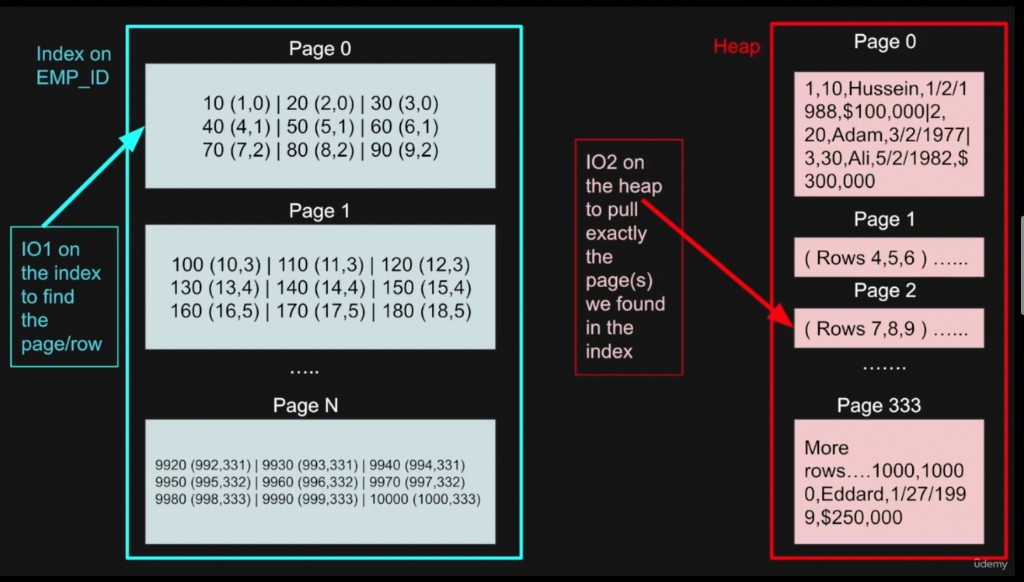
Diagram — Index lookup vs Heap fetch
- IO1 on the index: search the index on
EMP_IDto find the pointer(page_id, row_id). - IO2 on the heap: use that pointer to read the exact heap page and pull the full row.
Non-clustered / secondary indexes in PostgreSQL work the same idea: the index stores keys + a tuple pointer (ctid) into the heap; matching usually costs (at least) index I/O then heap I/O.
Example of a query:
Suppose you have a table of employees with an index onemail.Query:
sqlSELECT * FROM employees WHERE email = 'bob@email.com';Heap Only (no index):
The database has to scan every row in the table to find the one with Bob's email. If the table has 10,000 rows, it checks all 10,000 (could be hundreds of pages!). Very slow for big tables.With Index:
- The database first looks up
'bob@email.com'in the index (fast, usually just 1 or 2 pages read). - The index tells it exactly which heap page and row has Bob's data.
- It jumps straight there and reads just that page to get the full row.
- Result: The database does just 2 reads (IOs) instead of scanning everything. Much faster!
- The database first looks up
Row vs Column Oriented Databases
Row-Oriented Database (Row Store):
- Stores entire rows together in each block on disk; all the columns of a row are side-by-side.
- Reading a block gives you complete rows at once (all columns and their values for each row).
- Scanning for particular rows can take multiple IOs, but once you find the row, all its data is loaded together.
- Best for:
- Transactional systems (OLTP) where you often read or write full rows (e.g. inserting or updating records).
- Workloads that require keeping row integrity for joins or modifications.
- Example systems: PostgreSQL, MySQL, SQLite, etc.
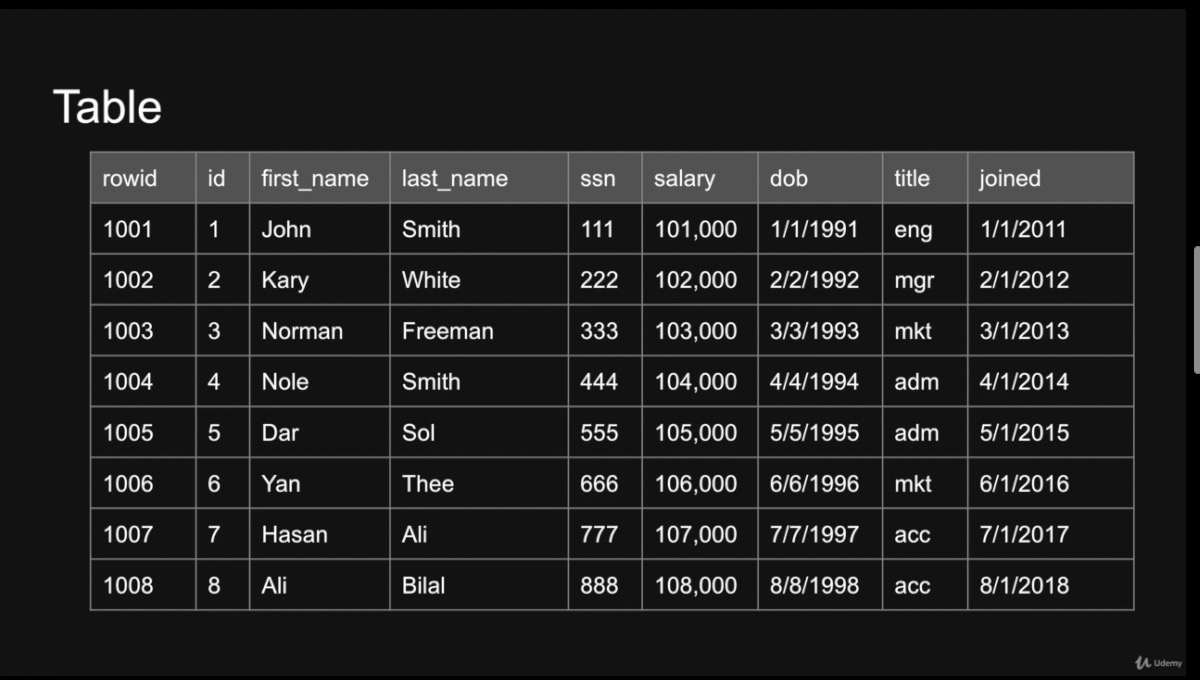
- Example table (row storage):
id name email 1 Alice alice@email.com 2 Bob bob@email.com 3 Charlie charlie@email.com
- Column-Oriented Database (Column Store):
- Stores all values of each column together in separate blocks (column chunks), so values for a given column are physically grouped.
- Reading a block returns many values from one column, but not whole rows.
- Fetching all values for a column (for filtering or aggregation) is very fast and efficient—just a few blocks might need to be loaded. But reconstructing full rows across many columns can require more IOs.
- Best for:
- Analytical workloads (OLAP), like reporting, aggregations, and filtering across huge tables.
- When you usually process only a few columns at a time, or want to scan large datasets column-wise.
- Example systems: ClickHouse, Amazon Redshift, Vertica, Apache Parquet, etc.
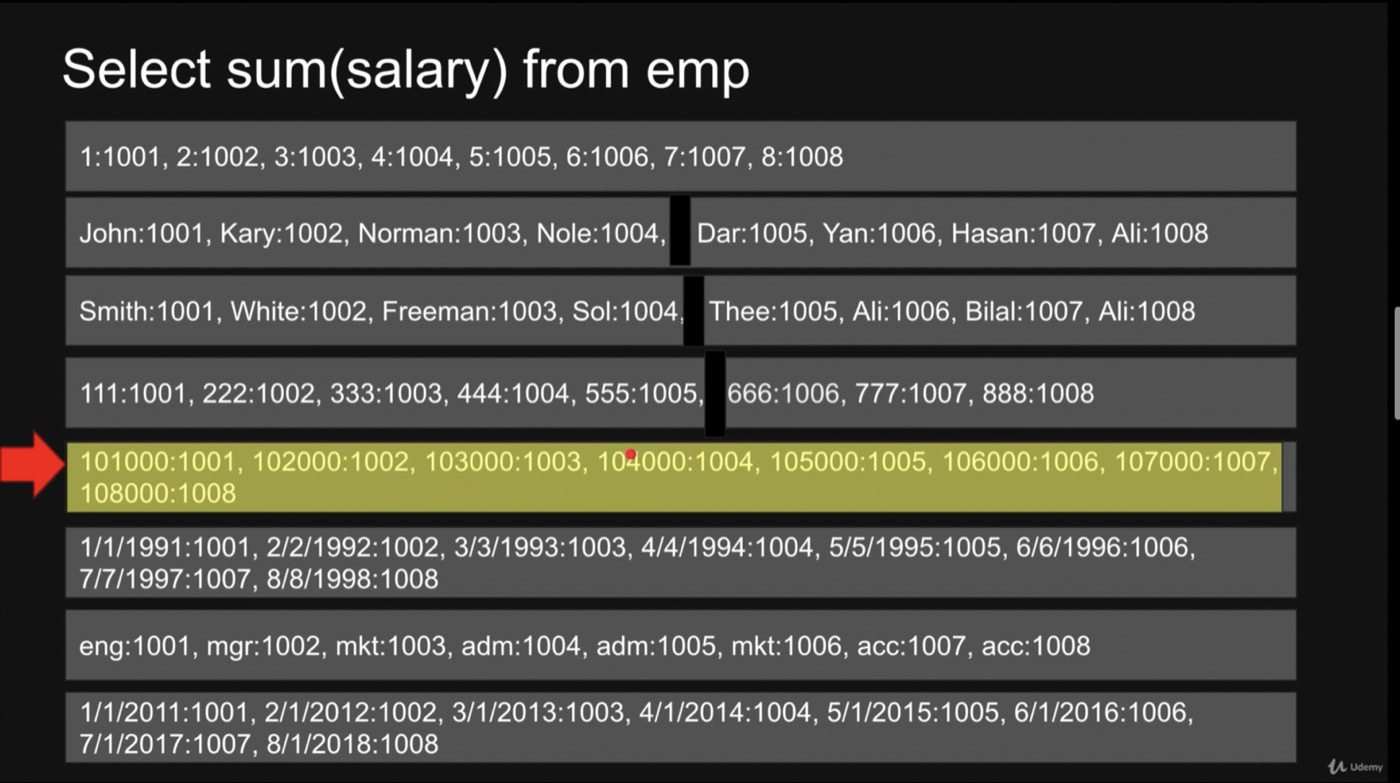
- Example (simplified view) — columns stored separately:
id:    [1,   2,    3,    ...]
name:  [Alice, Bob, Charlie, ...]
email: [alice@email.com, bob@email.com, charlie@email.com, ...]
Pros and Cons
| Row-Oriented Databases | Column-Oriented Databases |
|---|---|
| Fast for transactional reads/writes (full rows) | Slower for writes, especially for many columns at once |
| Ideal for OLTP (transactions, frequent updates) | Ideal for OLAP (analytics, aggregations, reporting) |
| Less effective data compression | Excellent compression (column similarity) |
| Inefficient for aggregation workloads | Extremely efficient for aggregation, filtering, scans on few columns |
| Efficient for queries involving many/all columns of a row | Inefficient for point queries fetching full rows |
04 — Database Indexing
- Status:
[ ] - Summary: Find rows efficiently, choose indexes for real queries, and measure the result.
- Focus: Scan plans, key vs included columns, index types, and read/write trade-offs.
Learning goal: By the end, you should be able to explain why a query uses an index, build a suitable one, and check whether it helps.
1. What an index does
Think of an index as a book's index: it helps you find a topic without reading every page. In PostgreSQL, table rows live in the heap, and an index is a separate structure that points to those rows.
A B-Tree, the default index type, stores ordered keys and references to heap tuples. It helps with equality (=), ranges (>, BETWEEN), and matching ORDER BY clauses. It does not sort the table itself.
The trade-off: Indexes can reduce read work, but take disk space and add write and maintenance work. Create them for queries you actually need to speed up.
2. Lab: compare a query before and after indexing
Use a PostgreSQL practice database. Run the blocks in order, in the same session, with autocommit enabled. The temporary table disappears when you disconnect, so you can repeat the lab in a new session.
Step 1 — Create 100,000 rows.
CREATE TEMP TABLE indexing_employees (
  id integer PRIMARY KEY,
  name text NOT NULL,
  email text NOT NULL,
  department_id integer NOT NULL,
  active boolean NOT NULL
);

INSERT INTO indexing_employees
SELECT n,
       'User ' || n,
       'user' || n || '@example.com',
       n % 100,
       n % 10 = 0
FROM generate_series(1, 100000) AS g(n);

ANALYZE indexing_employees;The primary key already creates a unique B-Tree on id. It does not create an index on email. ANALYZE gives the planner statistics about the data.
Step 2 — Measure an email lookup without an email index.
EXPLAIN (ANALYZE, BUFFERS)
SELECT id, name
FROM indexing_employees
WHERE email = 'user50000@example.com';Expect a Seq Scan: PostgreSQL examines the table and filters out nonmatching rows. Save the plan and execution time.
Step 3 — Add an index and run the same query.
CREATE INDEX indexing_employees_email_idx
ON indexing_employees (email);

EXPLAIN (ANALYZE, BUFFERS)
SELECT id, name
FROM indexing_employees
WHERE email = 'user50000@example.com';Expect an Index Scan: find the email in the index, then fetch id and name from the heap. Compare the work done and execution time with Step 2.
Plans and times depend on your data, settings, and cache. Repeat each query a few times; compare under similar conditions rather than expecting a fixed speedup.
3. Read the execution plan
| Plan | How it retrieves data | Common use |
|---|---|---|
| Seq Scan | Reads table pages and applies a filter. | Small tables or queries returning many rows. |
| Index Scan | Finds entries in the index, then visits the heap. | Selective lookups that need columns outside the index. |
| Index Only Scan | Gets values from the index; checks visibility and may visit the heap. | Queries whose required columns are available in the index. |
| Bitmap Index Scan + Bitmap Heap Scan | Collects row locations, then visits heap pages in page order. | Fetching multiple matches or combining indexes. |
Start with these fields:
- Index Cond: The condition used to search the index.
- Filter / Rows Removed by Filter: Work done after retrieving candidate rows.
- Estimated vs actual rows: Large differences can indicate outdated statistics or data the planner estimates poorly.
- Buffers: Page accesses through memory or reads; these are not a count of unique pages or physical disk operations.
- Heap Fetches: Heap visits during an index-only scan. Zero means no heap visits were needed for that execution.
- Execution Time: Time spent executing this measured query; planner cost is a separate estimate, not milliseconds.
EXPLAIN shows estimates. EXPLAIN ANALYZE executes the statement, including any changes made by an INSERT, UPDATE, or DELETE.
4. Key columns vs included columns
Key columns guide index searches and define ordering. Included columns store extra values for returning results; they do not define search order or uniqueness.
For WHERE email = ..., email is the search key. To return id and name without fetching their values from the heap, replace the lab's index with a covering index:
DROP INDEX indexing_employees_email_idx;

CREATE INDEX indexing_employees_email_cover_idx
ON indexing_employees (email) INCLUDE (id, name);

VACUUM (ANALYZE) indexing_employees;

EXPLAIN (ANALYZE, BUFFERS)
SELECT id, name
FROM indexing_employees
WHERE email = 'user50000@example.com';An Index Only Scan is now possible. PostgreSQL still checks whether each row is visible to the transaction. VACUUM can mark heap pages as all-visible in the visibility map, allowing heap visits to be skipped. Recent writes can make heap checks necessary again.
| Definition | Search / ordering keys | Extra values stored |
|---|---|---|
(email) | email | None |
(email, id) | email, then id | None |
(email) INCLUDE (id, name) | email | id, name |
A unique index on (email) INCLUDE (id) enforces uniqueness of email alone. Adding every column with INCLUDE can make the index expensive; an index-only plan is not automatically faster.
5. Three useful index strategies
These examples continue the same lab. Each solves a different query pattern.
Composite index — filter and sort together.
CREATE INDEX indexing_employees_department_id_idx
ON indexing_employees (department_id, id);

EXPLAIN (ANALYZE, BUFFERS)
SELECT id
FROM indexing_employees
WHERE department_id = 42
ORDER BY id
LIMIT 20;The index groups rows by department, then orders each group by id. For this query, put the equality filter first and the ordering column next. Queries on id alone are usually better served by the existing primary-key index. Later columns can sometimes be used without the leading column, including via PostgreSQL 18's skip scan; measure rather than treating the leftmost-prefix rule as absolute.
Partial index — index only the rows a query needs.
CREATE INDEX indexing_employees_active_id_idx
ON indexing_employees (id) WHERE active;

EXPLAIN (ANALYZE, BUFFERS)
SELECT id
FROM indexing_employees
WHERE active
ORDER BY id
LIMIT 20;Only 10% of the lab rows are active, so this index is smaller than one covering every row. The planner must be able to prove that the query's condition implies the index predicate. A generic parameterized condition such as active = $1 may prevent that proof. Index predicates cannot use changing expressions such as now().
Expression index — search a computed value.
CREATE INDEX indexing_employees_email_lower_idx
ON indexing_employees (lower(email));

ANALYZE indexing_employees;

EXPLAIN (ANALYZE, BUFFERS)
SELECT id
FROM indexing_employees
WHERE lower(email) = lower('USER50000@EXAMPLE.COM');Use a matching expression in the query. A plain index on email does not directly support searching lower(email); the expression index stores the computed value and adds write work.
6. Choose the index type
| Type | Useful for | Keep in mind |
|---|---|---|
| B-Tree | Equality, ranges, and ordering. | Start here for ordinary lookups. |
| Hash | Equality only. | Does not support ranges or ordering; compare with B-Tree before choosing it. |
| GIN | JSONB containment, arrays, and full-text search. | Matches components inside values; can add substantial write work. |
| GiST / SP-GiST | Spatial, range, or nearest-neighbor queries, depending on the type and operator class. | Choose according to the operators you need; PostGIS adds geographic support. |
| BRIN | Very large tables where values correlate with physical row order, such as append-only timestamps. | Stores compact summaries of page ranges; candidate rows still need checking. |
Index types are selected with USING, for example CREATE INDEX ... USING gin (metadata) for a JSONB column. The data type and operators must match the index's operator class.
For text patterns:
LIKE 'User 5%'can use a B-Tree; outside theClocale, prefix searches generally needtext_pattern_opsfortextorvarchar_pattern_opsforvarchar.LIKE '%User 5%'cannot use a normal B-Tree to seek a prefix. Consider a GIN or GiST trigram index throughpg_trgmfor substring searches.
7. Keep indexes useful
- Start with frequent or expensive queries and their
WHERE,JOIN, andORDER BYclauses. - Prefer indexes that narrow the search to a small part of the table. A low-cardinality column can still be useful when a particular value is rare.
- Check existing indexes:
PRIMARY KEYandUNIQUEconstraints already create them. PostgreSQL does not automatically index the referencing columns of a foreign key; consider those indexes for joins and parent-row updates or deletes. - Keep
ANALYZEstatistics and vacuum maintenance current. Inspect size and usage before removing an index; zero recorded scans alone is not proof that it is unnecessary. - Measure the read benefit against disk usage and write cost. On busy production tables, consider
CREATE INDEX CONCURRENTLYto allow writes during the build; it cannot run inside a transaction block.
Inspect the lab's index sizes and definitions:
SELECT indexname, indexdef
FROM pg_indexes
WHERE schemaname LIKE 'pg_temp_%'
  AND tablename = 'indexing_employees';

SELECT pg_size_pretty(pg_table_size('indexing_employees')) AS table_size,
pg_size_pretty(pg_indexes_size('indexing_employees')) AS indexes_size;A Seq Scan is not automatically a problem: it can be the cheapest plan for a small table or a query needing most rows. SELECT * does not forbid index use, but it often requires heap access because the index lacks some columns.
8. Check your understanding
- Why did the email lookup need a Seq Scan before Step 3?
- Why can
INCLUDE (id, name)make an index-only scan possible without makingnamea search key? - Why can an index-only scan still show heap fetches?
- Which lab index matches
WHERE department_id = 42 ORDER BY id LIMIT 20? - What would you measure before keeping another index?
Answers: There was no email index; included columns supply result values; visibility checks may need the heap; (department_id, id) matches the filter and order; compare query work and time, index size, and write overhead.
Remember: Design for the query → measure the plan → add the smallest useful index → measure again.
Further reading: PostgreSQL documentation on index types, multicolumn indexes, covering indexes, partial indexes, and expression indexes.
04.1 — Key vs Non-Key Columns (Lesson 005)
Goal: Decide which columns should guide a search and which should only supply output values.
A key column is part of the index's search order. A non-key column added with INCLUDE is stored as payload. For WHERE grade >= 90 ORDER BY grade DESC, grade should be a key; id can be included if the query only returns id and grade.
Practice setup: Run the following lessons in order in one PostgreSQL practice session with autocommit enabled. The temporary tables disappear when you disconnect. Lesson 009 uses a separate, ordinary practice table because temporary tables cannot demonstrate concurrent writes from another session.
CREATE TEMP TABLE indexing_students (
  id integer PRIMARY KEY,
  grade integer NOT NULL,
  name text NOT NULL,
  notes text NOT NULL
);

INSERT INTO indexing_students
SELECT n, n % 101, 'Student ' || n, repeat('Practice notes. ', 20)
FROM generate_series(1, 100000) AS g(n);

CREATE INDEX indexing_students_grade_idx
ON indexing_students (grade);

VACUUM (ANALYZE) indexing_students;

EXPLAIN (ANALYZE, BUFFERS)
SELECT id, grade FROM indexing_students
WHERE grade >= 90
ORDER BY grade DESC
LIMIT 100;The grade index can support the filter and ordering, but PostgreSQL must fetch id from the heap. The primary-key index does not automatically add id to every other index.
Replace the index and measure again:
DROP INDEX indexing_students_grade_idx;

CREATE INDEX indexing_students_grade_cover_idx
ON indexing_students (grade) INCLUDE (id);

EXPLAIN (ANALYZE, BUFFERS)
SELECT id, grade FROM indexing_students
WHERE grade >= 90
ORDER BY grade DESC
LIMIT 100;An index-only scan is possible because both required columns are available. Check Heap Fetches, buffers, and execution time. A backward B-Tree scan can provide descending order; a separate descending index is unnecessary for this single-column sort.
Check: Would INCLUDE (id) also cover SELECT name, grade? No. name is absent, so heap access is still required. Include only values needed by important queries; wider indexes take more space and add write work.
04.2 — Combining Indexes (Lesson 006)
Goal: Choose between separate indexes and a composite index for AND and OR queries.
CREATE TEMP TABLE indexing_pairs (
  id integer PRIMARY KEY,
  a integer NOT NULL,
  b integer NOT NULL,
  payload text NOT NULL
);

INSERT INTO indexing_pairs
SELECT n, n % 100, (n / 100) % 100, repeat('Payload ', 20)
FROM generate_series(1, 100000) AS g(n);

CREATE INDEX indexing_pairs_a_idx ON indexing_pairs (a);
CREATE INDEX indexing_pairs_b_idx ON indexing_pairs (b);
ANALYZE indexing_pairs;

EXPLAIN (ANALYZE, BUFFERS)
SELECT payload FROM indexing_pairs WHERE a = 42 AND b = 17;

EXPLAIN (ANALYZE, BUFFERS)
SELECT payload FROM indexing_pairs WHERE a = 42 OR b = 17;PostgreSQL can build row-location bitmaps from separate indexes. BitmapAnd intersects matches; BitmapOr combines them. The planner can also choose one index and filter, or scan the table. Two available indexes do not mean both must be used, and combining them does not imply parallel execution.
Now replace the index on a with a composite index; keep the index on b:
DROP INDEX indexing_pairs_a_idx;
CREATE INDEX indexing_pairs_ab_idx ON indexing_pairs (a, b);

EXPLAIN (ANALYZE, BUFFERS)
SELECT payload FROM indexing_pairs WHERE a = 42 AND b = 17;| Query pattern | Design to consider |
|---|---|
a = ... | (a) or the leading part of (a, b). |
b = ... | (b); (a, b) may also help in some cases through skip scan. |
a = ... AND b = ... | (a, b) can search the pair directly; separate indexes can be combined. |
a = ... OR b = ... | Separate searchable paths, such as (a, b) plus (b), can allow BitmapOr. |
Check: Why keep (b) alongside (a, b)? It provides a direct path for b-only queries. Keep it only if the workload justifies its storage and maintenance cost.
Reference: combining multiple indexes.
04.3 — How the Optimizer Chooses an Index (Lesson 007)
Goal: Understand why a valid index can be ignored.
The optimizer compares estimated plan costs. It considers table size, matching-row estimates, the columns needed, ordering, LIMIT, data distribution, and the expected cost of reading index and heap pages.
| Choice | Why it may be cheaper |
|---|---|
| One index, then a filter | The first condition already narrows the search to very few rows. |
| Combined indexes | Their intersection avoids enough heap work to justify scanning both. |
| Sequential scan | Most rows are needed, so walking the table avoids repeated index-to-heap lookups. |
Continue with the table from Lesson 006:
-- A primary-key lookup finds at most one row; b can be checked afterward.
EXPLAIN (ANALYZE, BUFFERS)
SELECT payload FROM indexing_pairs WHERE id = 1742 AND b = 17;

-- Every row matches: a full table scan is a reasonable choice.
EXPLAIN (ANALYZE, BUFFERS)
SELECT payload FROM indexing_pairs WHERE a >= 0;

-- Refresh sampled statistics after substantial data changes.
ANALYZE indexing_pairs;Compare estimated rows with actual rows. A large gap is a reason to investigate statistics or correlations between columns. ANALYZE updates planner statistics; VACUUM handles dead tuples and visibility maintenance. VACUUM FULL rewrites and locks the table, so it is not a routine fix for a poor plan.
Check: Is an index on a column with two distinct values always useless? No. One value may be rare enough for an index to help. The distribution and the actual query matter more than the count of distinct values alone.
Reference: planner statistics.
04.4 — Bitmap Scan vs Index Scan vs Table Scan (Lesson 008)
Goal: Recognize how PostgreSQL balances scattered heap reads against reading the entire table.
An Index Scan follows matching index entries to heap tuples as it proceeds. A Bitmap Index Scan first collects matching locations; a Bitmap Heap Scan then visits the selected heap pages in physical order. A Seq Scan walks the table directly.
-- A single row: usually an Index Scan.
EXPLAIN (ANALYZE, BUFFERS)
SELECT payload FROM indexing_pairs WHERE id = 50000;

-- Multiple matches across the table: a bitmap plan is a candidate.
EXPLAIN (ANALYZE, BUFFERS)
SELECT payload FROM indexing_pairs WHERE a = 42;

-- Most rows: usually a Seq Scan.
EXPLAIN (ANALYZE, BUFFERS)
SELECT payload FROM indexing_pairs WHERE id > 100;These are candidates, not guaranteed plans. There is no universal percentage at which PostgreSQL must switch scan types.
Read a bitmap plan from the inner nodes outward:
Bitmap Heap Scan
  Recheck Cond: ...
  -> BitmapAnd / BitmapOr       (only when combining scans)
       -> Bitmap Index Scan
-> Bitmap Index Scan- Exact heap blocks: The bitmap retains matching tuple locations within a page.
- Lossy heap blocks: Under memory pressure, it may keep only page-level information. Tuples on those pages must be rechecked.
- Rows Removed by Index Recheck: Candidates rejected when the index condition is checked again. Some index methods also require rechecks.
- Ordering: Bitmap processing loses index order.
ORDER BYmay need an additional sort.
Check: Why might ORDER BY ... LIMIT 10 favor an ordinary index scan? A matching B-Tree can return the first rows in order and stop early, avoiding bitmap construction and sorting.
Reference: interpreting EXPLAIN.
04.5 — Create Index Concurrently (Lesson 009)
Goal: Add an index while allowing application writes to continue.
A normal CREATE INDEX permits reads but blocks writes to its table during the build. CREATE INDEX CONCURRENTLY permits ordinary reads and writes, at the cost of extra scanning and waiting for relevant transactions.
Use an ordinary table in a disposable practice database, not the temporary tables above. Run each command separately with autocommit enabled:
CREATE TABLE indexing_live_demo (
  id bigint GENERATED ALWAYS AS IDENTITY PRIMARY KEY,
  email text NOT NULL
);

INSERT INTO indexing_live_demo (email)
SELECT 'user' || n || '@example.com'
FROM generate_series(1, 100000) AS g(n);

CREATE INDEX CONCURRENTLY indexing_live_demo_email_idx
ON indexing_live_demo (email);To observe concurrent writes, try an insert from a second connection while the build is running. This small build may finish too quickly to observe; a larger practice dataset makes the overlap easier to see. In the second connection, use:
INSERT INTO indexing_live_demo (email) VALUES ('new-user@example.com');Before treating the index as ready, inspect it:
SELECT c.relname AS index_name, i.indisready, i.indisvalid
FROM pg_index AS i
JOIN pg_class AS c ON c.oid = i.indexrelid
WHERE i.indexrelid = 'indexing_live_demo_email_idx'::regclass;

SELECT pid, phase, blocks_done, blocks_total
FROM pg_stat_progress_create_index
WHERE relid = 'indexing_live_demo'::regclass;A successful completed build has indisvalid = true; the progress view has no row after completion. Important limits:
- It cannot run inside
BEGIN/COMMIT, including migrations automatically wrapped in a transaction. - Long-running transactions can delay completion. Only one concurrent index build can run on a given table at a time.
- It still consumes CPU, I/O, and storage, so application queries may slow down during the build.
- Failure can leave an invalid index that the planner cannot use but that may still add write overhead. Diagnose the cause, then drop the invalid index and retry. Do not rely on
IF NOT EXISTSto repair it.
Check: Does “concurrently” mean “instant and free of locks”? No. It avoids the write-blocking table lock of a normal build, but still takes other locks, does work, and may wait.
Reference: CREATE INDEX and concurrent-build caveats.
04.6 — Bloom Filters (Lesson 010)
Goal: Avoid expensive lookups when an item is definitely absent.
A Bloom filter represents a set using a bit array and several hash functions. It stores membership information rather than the original values.
- Insert: Hash the item to several positions and set those bits to 1.
- Check: Hash the candidate using the same functions.
- Any bit is 0: The candidate is definitely absent from the represented set.
- All bits are 1: The candidate may be present; perform the authoritative lookup.
For example, suppose Ali sets positions 2, 5, and 9. A name checking positions 2, 4, and 9 is absent if bit 4 is still 0. Another name may map to three bits already set by other names, producing a false positive.
Username request
  → Bloom filter says absent → skip the database lookup
→ Bloom filter says maybe → query the database to confirmCorrectness matters: The “no false negatives” guarantee applies only to a correctly maintained filter containing every item in the set. If a database insert is missing from the filter, an “absent” result is unsafe. Coordinate updates and rebuilds; when coverage is uncertain, fall back to the database. A unique database constraint remains responsible for enforcing username uniqueness.
More items in a fixed-size filter increase false positives. Size it for expected capacity and a target false-positive rate. A standard Bloom filter cannot safely delete an item by clearing its bits because other items may share them; use a suitable variant or rebuild.
Check: Can a Bloom filter return a user's profile or confirm that a username is taken? No. It only answers “definitely absent” or “possibly present.” PostgreSQL's optional bloom index uses Bloom signatures and heap rechecks; it is distinct from an application-side membership filter.
References: Bloom filter survey · PostgreSQL bloom index.
04.7 — Working with Billion-Row Tables (Lesson 011)
Goal: Reduce the amount of data a query processes before adding infrastructure.
A billion rows is not, by itself, a reason to shard. Row width, query patterns, write rate, working-set size, maintenance, and hardware determine the pressure on the system.
| Approach | What it changes | Main trade-off |
|---|---|---|
| Indexing | Narrows searches to matching entries and rows. | Extra storage and write work. |
| Partitioning | Splits one logical table; pruning can skip irrelevant partitions. | Queries need useful partition-key conditions; more objects to manage. |
| Sharding | Distributes data and load across database hosts. | Routing, cross-shard queries, transactions, and rebalancing become harder. |
| Parallel processing | Divides scanning or computation among workers. | More resources; useful for large analytics, not a substitute for selective lookups. |
| Retention / summaries | Removes obsolete data or stores reusable aggregate results. | Must preserve business requirements and manage freshness. |
Example: a social-following table. A separate row per relationship supports uniqueness, reverse lookups, and pagination. Storing every follower in one growing JSON array can create a large, frequently rewritten row and contention; fewer rows do not automatically mean a more scalable design.
For a large practice table, match the index to the query and paginate by a stable key:
CREATE TEMP TABLE indexing_follows (
  follower_id bigint NOT NULL,
  followed_id bigint NOT NULL,
  PRIMARY KEY (follower_id, followed_id)
);

INSERT INTO indexing_follows
SELECT follower, followed
FROM generate_series(1, 1000) AS f(follower)
CROSS JOIN generate_series(1, 100) AS t(followed);

CREATE INDEX indexing_follows_reverse_idx
ON indexing_follows (followed_id, follower_id);
ANALYZE indexing_follows;

EXPLAIN (ANALYZE, BUFFERS)
SELECT follower_id FROM indexing_follows
WHERE followed_id = 42 AND follower_id > 500
ORDER BY follower_id
LIMIT 50;500 is the last follower ID from the previous page. The reverse index matches the equality condition, cursor range, and sort order. This keyset pagination avoids walking an ever-growing OFFSET. The small dataset tests the query shape; it does not demonstrate billion-row performance or guarantee a fixed snapshot across page requests.
Practical order: Measure slow queries → improve indexes and result sizes → consider retention and partition pruning → shard when measured capacity or distribution requirements justify it. For time partitioning, include a time condition that lets PostgreSQL prune partitions; partitioning without pruning may still read many partitions.
Check: Will adding more workers make a one-row lookup efficient if every worker still scans a large part of the table? No. Reducing the searched data is usually the first improvement for that workload.
Reference: PostgreSQL partitioning and pruning. Continue with Chapters 06 and 07 for partitioning and sharding in more detail.
05 — B-Tree vs B+Tree in Production Database Systems
- Status:
[ ] - Summary: Understand how balanced trees reduce lookup work and how database storage changes the cost.
- Focus: All nine course lessons: scans, B-Tree structure, B+Tree ranges, caching, and PostgreSQL vs MySQL InnoDB.
05.1 — Introduction and Learning Path (Lesson 001)
Goal: Connect the tree diagrams to what a database actually reads.
The main question is: How can we find a few rows without reading the entire table? Follow the path from full scans to balanced trees, then compare how PostgreSQL and InnoDB retrieve the row after finding an index entry.
Keep three things separate:
- Search key: The value being indexed, such as an employee ID.
- Child pointer: A reference to another page inside the tree.
- Row reference or payload: The information used to retrieve or return the result.
A textbook tree illustrates the structure; a production index adds page layouts, concurrency, caching, and transaction visibility. Database documentation often calls the whole family B-Tree, even when its implementation has B+Tree-style leaves and separators.
Check: Does knowing that an index is a B-Tree tell you where the full row is stored? No. You also need to know the storage engine and index layout.
05.2 — Full Table Scans (Lesson 002)
Goal: Recognize the problem an index solves and when scanning remains sensible.
A full scan examines table pages and tests rows against a condition. It can be expensive when a large table has only one matching row, but sensible when most rows are needed. Pages already in memory avoid storage reads; a page access is not automatically one physical disk operation.
Practice: Use one PostgreSQL practice session with autocommit enabled. Run the SQL blocks in order. The temporary table disappears when you disconnect.
CREATE TEMP TABLE btree_people (
  id integer NOT NULL,
  name text NOT NULL,
  email text NOT NULL,
  notes text NOT NULL
);

INSERT INTO btree_people
SELECT n, 'Person ' || n, 'person' || n || '@example.com',
       repeat('Learning about trees. ', 10)
FROM generate_series(1, 100000) AS g(n);

ANALYZE btree_people;

EXPLAIN (ANALYZE, BUFFERS)
SELECT name FROM btree_people WHERE id = 50000;There is no index yet, so expect a Seq Scan. Save the plan, rows removed by the filter, buffers, and execution time. Parallel scans can distribute work for eligible tables and queries; they do not eliminate that work. PostgreSQL temporary tables are not scanned by parallel workers.
Check: Is a Seq Scan always the slowest choice? No. For a small table or a query returning most rows, it may be cheapest.
05.3 — The Original B-Tree (Lesson 003)
Goal: Understand nodes, keys, balance, and fan-out.
A B-Tree is a balanced, multiway search tree. Each node holds ordered keys. Internal nodes have child pointers that divide the remaining key space; all leaves are at the same depth.
In the classic B-Tree model, entries associated with records can appear in internal nodes as well as leaves. Their associated value might be a row reference rather than the full row.
                  [4 | 8]
                /    |    \
[1 2 3] [5 6 7] [9 10 11]Every displayed key has an associated record value or reference in this simplified model. To search for 7, compare it with 4 and 8, follow the middle child, then find 7 there. To search for 4, the matching entry is already in the root.
Fan-out is the number of children an internal node can address. If a node has k separator keys, it normally has k + 1 children. Textbooks use different definitions of “order” and “degree”; focus on the structure rather than assuming those terms always mean the same number.
Check: Why use many children instead of a binary tree? More branches per page can make the tree shallower, reducing the number of pages on a search path.
05.4 — How B-Trees Improve Performance (Lesson 004)
Goal: Explain why a lookup can touch far fewer pages than a table scan.
At each level, the search chooses a smaller key range. In database implementations, a tree node typically occupies a page containing many entries. With high fan-out, even a large index can have relatively few levels.
For intuition, a fan-out of 100 gives up to 100 child pages from one internal page and 10,000 pages after another branching level. Real capacity depends on occupancy, key width, payload, and page overhead; these are not benchmark guarantees.
Continue the lab:
CREATE UNIQUE INDEX btree_people_id_idx ON btree_people (id);

EXPLAIN (ANALYZE, BUFFERS)
SELECT name FROM btree_people WHERE id = 50000;Expect an Index Scan: the tree finds the index entry, then PostgreSQL fetches name from the heap. Compare with Lesson 002. Index traversal and heap retrieval are distinct costs, and repeated runs can benefit from caching.
Inserting a key into a full page can cause a page split. Entries are divided, a parent separator is added, and a split may propagate upward. These operations preserve the tree's balance but add write work.
Check: Does an index make writes free? No. Inserts must maintain the tree, and splits can require additional page changes.
05.5 — Limitations of the Classic B-Tree (Lesson 005)
Goal: Understand the motivation for separating navigation from record data.
When internal entries carry both keys and record payload or references, fewer navigation entries may fit on a page. That can reduce fan-out and increase the number of pages in the tree.
Classic B-Trees can answer range queries through an ordered traversal. They do not inherently require a fresh root-to-leaf search for every key. However, entries spread across internal nodes and leaves make range traversal less straightforward than walking a linked sequence of leaves.
The design questions are:
- Can internal pages mostly store navigation information?
- Can all record entries be gathered at the leaf level?
- Can a range scan continue from one leaf to the next?
Check: Does removing payload from internal pages remove it from the index? No. A B+Tree moves record entries to the leaves; it still needs to store them.
05.6 — B+Tree Structure and Range Queries (Lesson 006)
Goal: Follow a range scan from its first matching leaf entry.
In the textbook B+Tree model, internal nodes hold separator keys and child pointers. The record entries are stored in the leaves, which are commonly linked in key order. Some separator values also appear among the leaf keys.
                    [4 | 7]              navigation
                   /   |   \
[1 2 3] → [4 5 6] → [7 8 9] leaf entriesTo retrieve keys 4 through 8:
- Descend through the separators to the leaf containing
4. - Read entries
4,5, and6. - Follow the next-leaf link and read
7and8. - Stop when the upper bound is exceeded.
The keys are logically adjacent, but their pages are not guaranteed to be physically adjacent on disk. Fetching full rows through a secondary index can still involve scattered table reads.
Continue the PostgreSQL lab:
VACUUM (ANALYZE) btree_people;

EXPLAIN (ANALYZE, BUFFERS)
SELECT id FROM btree_people
WHERE id BETWEEN 50000 AND 50100
ORDER BY id;

EXPLAIN (ANALYZE, BUFFERS)
SELECT id, name FROM btree_people
WHERE id BETWEEN 50000 AND 50100
ORDER BY id;The first query can use an Index Only Scan; inspect Heap Fetches. The second needs name, which is outside this index, and can use an Index Scan. A matching B-Tree scan can provide the requested ordering without a separate sort. The planner still chooses the actual plan.
Check: Is a range scan free after finding the first key? No. It must read the matching entries and, when necessary, fetch their rows.
05.7 — Production DBMS Considerations (Lesson 007)
Goal: Account for pages, cache, and write behavior beyond the diagram.
| Consideration | Practical effect |
|---|---|
| Key and payload width | Wider entries often mean fewer entries per page and a larger index. |
| Internal-page caching | Frequently used upper levels may stay in memory even when the whole index does not fit. |
| Leaf pages | Range scans can touch many leaf pages; caching and locality matter. |
| Page splits | Inserts can add maintenance work and change page occupancy. |
| MVCC visibility | Having a value in an index does not automatically mean PostgreSQL can skip heap checks. |
PostgreSQL pages are normally 8 KiB; InnoDB's default page size is 16 KiB. These are database pages, not necessarily storage-device block sizes. Larger pages alone do not determine which engine is faster.
Inspect your PostgreSQL configuration and the lab's storage:
SHOW block_size;

SELECT pg_size_pretty(pg_table_size('btree_people')) AS table_size,
pg_size_pretty(pg_indexes_size('btree_people')) AS indexes_size;Compare buffer counts and execution time under similar conditions. Do not equate tree height with disk reads: cached internal pages can make traversal cheap, while fetching many heap rows can dominate the query.
Check: Must the entire index fit in RAM to be useful? No. Cached upper levels and frequently accessed leaves can still help substantially.
05.8 — Storage Costs: PostgreSQL vs MySQL InnoDB (Lesson 008)
Goal: Understand what an index entry points to in each engine.
| Detail | PostgreSQL | MySQL InnoDB |
|---|---|---|
| Main row storage | Heap, separate from indexes. | Leaf records of the clustered index, normally organized by primary key. |
| Secondary-index leaf | Indexed values and heap tuple references (TIDs), plus optional included values. | Secondary-key values and primary-key columns. |
| Lookup needing other columns | Search index → fetch heap tuple. | Search secondary index → search clustered index by primary key → retrieve row. |
| Primary-key lookup | Search primary-key index → fetch heap if needed. | Search clustered index → retrieve row at its leaf. |
| Wider primary key | Enlarges its own index; not automatically copied into unrelated secondary indexes. | Adds storage to secondary indexes that carry the primary-key columns. |
These are ordinary lookup paths; covering queries and transaction visibility can change the work needed. PostgreSQL's B-Tree implementation uses leaf entries and navigation pages; its documentation and SQL still call the method btree.
PostgreSQL:    email index → heap tuple → name
InnoDB: email index → primary key → clustered leaf → nameKey-width example: A BIGINT value uses 8 bytes; a binary UUID uses 16 bytes. A UUID written as text usually contains 36 characters. Those figures describe the values, not the complete size of an index entry or its overhead.
In InnoDB, wider primary keys can enlarge multiple secondary indexes. Random insertion order can also spread writes across leaf pages; increasing keys often improve locality but can concentrate concurrent inserts on the right edge. UUID choice is therefore a workload decision, not an automatic mistake. Time-ordered UUIDs and compact binary storage address different aspects of the cost.
PostgreSQL has its own update trade-offs: a changed row version may require new index entries. Eligible HOT updates can avoid that when columns referenced by ordinary indexes are unchanged and the new version fits on the same heap page. The row-reference difference alone does not establish a universally faster engine.
Check: Does InnoDB's clustered leaf contain just a pointer to the row? No. It holds the row record itself, although large values may have parts stored off-page.
References: InnoDB clustered and secondary indexes · InnoDB physical index structure · PostgreSQL HOT updates.
05.9 — Summary and Self-Check (Lesson 009)
Goal: Explain the complete path from a query to its result.
| Question | Answer |
|---|---|
| Why does a tree help? | It narrows the search at each level instead of inspecting every row. |
| What changes in a B+Tree? | Internal pages guide navigation; record entries are in the leaves. |
| Why are linked leaves useful? | A range scan can continue through ordered leaf entries. |
| What determines lookup cost? | Tree pages, caching, matching-entry count, row retrieval, and visibility checks. |
| Why does the engine matter? | PostgreSQL points into a heap; InnoDB secondary indexes lead to a clustered index. |
Try explaining these without looking back:
- Trace the path for
SELECT name FROM btree_people WHERE id = 50000in each engine. - Explain why
SELECT idcan avoid work thatSELECT id, namerequires in the lab. - Describe how a wider primary key affects InnoDB secondary indexes.
- Explain why an index-only plan may still fetch heap tuples.
- Name a workload where scanning the table is a reasonable choice.
Answers: PostgreSQL searches its primary-key index then the heap; InnoDB reaches the row in the clustered leaf. The lab's index stores id, not name. InnoDB secondary entries carry primary-key columns. PostgreSQL may need heap visibility checks. Scanning can suit a small table or a query returning most rows.
Remember: Tree structure narrows the search; storage layout, cache, and workload determine the real cost.
Further reading: PostgreSQL B-Tree indexes, PostgreSQL B-Tree implementation notes, and index-only scans.
06 — Database Partitioning
- Status:
[ ] - Summary: Split one logical table into physical partitions so queries and maintenance can work on the relevant data.
- Focus: All 14 tutorial lessons: horizontal and vertical partitioning, range/list/hash strategies, sharding, the PostgreSQL grades lab, performance, storage, trade-offs, and automation.
06.1 — Introduction and Learning Path (Lesson 001)
Goal: Understand why partitioning exists, implement it, and measure whether it helps.
A large table can be difficult to query, load, and maintain. Partitioning groups its rows into smaller physical tables while keeping a logical parent that applications can query. The useful question is which data can this operation avoid touching?
This chapter follows the supplied tutorial's 14 lessons. Its grades example keeps the original four boundaries and 10-million-row dataset; the examples use PostgreSQL 18 syntax and clarify details that are easy to miss in the lecture. Unless stated otherwise, partitioning means horizontal partitioning within a PostgreSQL database.
By the end, you should be able to:
- Choose a partition key from actual query and retention requirements.
- Explain horizontal partitioning, vertical splitting, and sharding.
- Create range, list, and hash partitions.
- Load a partitioned table and inspect its physical children and indexes.
- Verify pruning with
EXPLAIN, rather than assume a speedup. - Attach prepared data, detach old data, and automate partition creation.
Lab order: Run Lessons 006–010 in the same database. The examples in Lessons 003–004 and 011 use separate table names. Lesson 014 uses a separate schema. Keep autocommit enabled unless a block explicitly starts a transaction. Shell commands run in a terminal; SQL and backslash commands run in psql.
06.2 — What Is Partitioning? (Lesson 002)
Goal: Follow a query from the logical table to its relevant physical partition.
Imagine a million customers divided into five ranges:
| Physical partition | Customer IDs, inclusive |
|---|---|
customers_200k | 1–200,000 |
customers_400k | 200,001–400,000 |
customers_600k | 400,001–600,000 |
customers_800k | 600,001–800,000 |
customers_1m | 800,001–1,000,000 |
The application still sends:
SELECT name FROM customers WHERE id = 700001;If customers is partitioned by these ID ranges, the database can exclude the other four partitions and search customers_800k. This exclusion is partition pruning. Within that partition, it still needs a suitable access method: an index lookup, a bitmap scan, or a sequential scan.
Application: SELECT ... FROM customers WHERE id = 700001
                         |
             Parent's partition boundaries
                         |
             Prune four irrelevant partitions
                         |
                customers_800k
                         |
Local index or table scanKeep these terms separate:
- Partitioned table: The logical parent. In PostgreSQL declarative partitioning it has no row storage of its own.
- Partition: A physical child that stores rows, or an intermediate parent with further subpartitions.
- Partition key: The column(s) or expression(s) used to assign rows, such as
id,created_at, orregion. - Partition bounds: The permitted values for a child.
- Routing: Choosing a destination for an insert or a changed partition key.
- Pruning: Eliminating children that cannot satisfy a query's partition-key conditions.
Partitioning and indexing complement each other. Pruning chooses tables; indexes locate entries inside tables. Pruning does not require an index on the partition key. An indexed million-row table can already answer a selective lookup efficiently; partitioning is not automatically faster merely because there are many rows.
Check: If the table is partitioned by id, can WHERE name = 'Kim' identify one ID partition? No. Without a usable ID condition, several or all partitions may need to be searched.
Reference: PostgreSQL declarative partitioning.
06.3 — Vertical vs Horizontal Partitioning (Lesson 003)
Goal: Distinguish splitting rows from splitting columns.
| Approach | What is separated? | Typical reason |
|---|---|---|
| Horizontal partitioning | Groups of rows with the same columns. | Pruning, retention, and maintenance by range or category. |
| Vertical splitting | Groups of columns connected by a shared key. | Separate frequently read attributes from large or rarely read payloads. |
For horizontal partitioning, every customer partition has columns such as id, name, and email. For vertical splitting, an application might keep a small profile table and a separate document table:
CREATE TABLE partitioning_profiles (
  id bigint PRIMARY KEY,
  name text NOT NULL,
  email text NOT NULL
);

CREATE TABLE partitioning_documents (
  customer_id bigint PRIMARY KEY
    REFERENCES partitioning_profiles (id),
  document bytea NOT NULL
);

INSERT INTO partitioning_profiles
VALUES (1, 'Kim', 'kim@example.com');

INSERT INTO partitioning_documents
VALUES (1, decode('48656c6c6f', 'hex'));

-- Frequent path: only the profile is needed.
SELECT name, email FROM partitioning_profiles WHERE id = 1;

-- Read the optional document when it is needed.
SELECT p.name, d.document
FROM partitioning_profiles AS p
LEFT JOIN partitioning_documents AS d ON d.customer_id = p.id
WHERE p.id = 1;The shared key maintains the relationship; PRIMARY KEY (customer_id) allows at most one document per customer. An inner join would omit customers without documents, so the example uses a left join.
In PostgreSQL this vertical split is ordinary relational design, not PARTITION BY. The database does not automatically reconstruct the original table when an application queries partitioning_profiles; use a join or define a view. Splitting columns resembles normalization but does not, by itself, establish a particular normal form.
The document table can be assigned to a tablespace backed by slower storage. PostgreSQL also stores some large values out of line through TOAST, so a large bytea column does not mean every profile query reads its entire payload. Measure the benefit of splitting; consider joins, extra writes, and lifecycle consistency.
Check: Does PARTITION BY RANGE (id) move a document column to a separate table? No. It divides rows, preserving the parent's columns in each child.
Reference: PostgreSQL TOAST storage.
06.4 — Partitioning Types (Lesson 004)
Goal: Match range, list, and hash strategies to a workload.
Range partitioning groups adjacent values. It suits time-series measurements, logs, invoices, and ID intervals. PostgreSQL range bounds are lower-inclusive and upper-exclusive: [from, to). October's partition includes October 1 but excludes November 1.
CREATE TABLE partitioning_events (
  id bigint NOT NULL,
  occurred_at timestamptz NOT NULL,
  message text NOT NULL,
  PRIMARY KEY (occurred_at, id)
) PARTITION BY RANGE (occurred_at);

CREATE TABLE partitioning_events_2026_10
PARTITION OF partitioning_events
FOR VALUES FROM ('2026-10-01 00:00:00+00')
           TO ('2026-11-01 00:00:00+00');

CREATE TABLE partitioning_events_2026_11
PARTITION OF partitioning_events
FOR VALUES FROM ('2026-11-01 00:00:00+00')
           TO ('2026-12-01 00:00:00+00');

INSERT INTO partitioning_events VALUES
  (1, '2026-10-31 23:59:59+00', 'October event'),
  (2, '2026-11-01 00:00:00+00', 'November event');

SELECT tableoid::regclass AS partition, id, occurred_at
FROM partitioning_events ORDER BY id;

EXPLAIN
SELECT * FROM partitioning_events
WHERE occurred_at >= '2026-10-01 00:00:00+00'
AND occurred_at < '2026-11-01 00:00:00+00';Use explicit time-zone offsets for timestamp boundaries. The query expresses the same half-open interval as the partition; avoid an inclusive BETWEEN that also includes the next month's midnight. A function such as date_trunc('month', occurred_at) in a filter can make pruning harder; check its plan rather than assume the planner derives the equivalent range.
List partitioning assigns explicit categories, such as states or regions:
CREATE TABLE partitioning_orders (
  id bigint NOT NULL,
  region text NOT NULL,
  total numeric(12, 2) NOT NULL,
  PRIMARY KEY (region, id)
) PARTITION BY LIST (region);

CREATE TABLE partitioning_orders_west
PARTITION OF partitioning_orders FOR VALUES IN ('CA', 'OR', 'WA');

CREATE TABLE partitioning_orders_south
PARTITION OF partitioning_orders FOR VALUES IN ('AL', 'GA');

CREATE TABLE partitioning_orders_other
PARTITION OF partitioning_orders DEFAULT;

INSERT INTO partitioning_orders VALUES
  (1, 'CA', 125.00), (2, 'AL', 80.00), (3, 'NY', 55.00);

SELECT tableoid::regclass AS partition, id, region
FROM partitioning_orders ORDER BY id;A DEFAULT partition catches values not covered by another child. It prevents some missing-partition errors, but requires monitoring. Before adding a dedicated NY partition, move any NY rows out of the default child; otherwise PostgreSQL rejects the new bounds because existing rows belong there. A heavily populated category can also become a hot partition.
Hash partitioning assigns a key's internal hash to a bucket:
CREATE TABLE partitioning_sessions (
  user_id bigint NOT NULL,
  token text NOT NULL,
  PRIMARY KEY (user_id, token)
) PARTITION BY HASH (user_id);

CREATE TABLE partitioning_sessions_h0 PARTITION OF partitioning_sessions
FOR VALUES WITH (MODULUS 4, REMAINDER 0);
CREATE TABLE partitioning_sessions_h1 PARTITION OF partitioning_sessions
FOR VALUES WITH (MODULUS 4, REMAINDER 1);
CREATE TABLE partitioning_sessions_h2 PARTITION OF partitioning_sessions
FOR VALUES WITH (MODULUS 4, REMAINDER 2);
CREATE TABLE partitioning_sessions_h3 PARTITION OF partitioning_sessions
FOR VALUES WITH (MODULUS 4, REMAINDER 3);

INSERT INTO partitioning_sessions VALUES (42, 'sample-token');

SELECT tableoid::regclass AS partition, user_id
FROM partitioning_sessions;

EXPLAIN SELECT * FROM partitioning_sessions WHERE user_id = 42;Do not calculate the destination as user_id % 4: PostgreSQL hashes the value first. Hash partitioning can spread distinct keys, but all rows for one hot key still share a destination. Equality lookups can prune; a range of user IDs generally cannot select a contiguous subset of hash buckets. PostgreSQL hash partitions are not an automatically managed consistent-hashing ring; changing bucket coverage requires a planned migration.
| Strategy | Useful condition | Main design concern |
|---|---|---|
| Range | occurred_at >= start AND occurred_at < end | Future bounds, late arrivals, and uneven growth. |
| List | region = 'CA' | Category skew and handling new categories. |
| Hash | user_id = 42 | Hot keys and redistribution when expanding. |
Subpartitioning combines strategies, for example monthly ranges with hash children by tenant. It increases the number of objects: 24 months × 8 buckets means 192 leaf partitions. Add it only when a measured requirement justifies the extra planning and maintenance work.
Reference: partition bounds and strategies.
06.5 — Partitioning vs Sharding (Lesson 005)
Goal: Separate local organization from distribution across servers.
| Concern | Local PostgreSQL partitioning | Sharding |
|---|---|---|
| Physical placement | Children belong to one database instance; tablespaces may use different devices. | Data subsets are placed on separate database servers or instances. |
| Routing | PostgreSQL routes writes and plans reads through the parent. | An application, router, or distributed database chooses shards. |
| Capacity | Uses the resources of that instance. | Can distribute storage and compute across machines. |
| Transactions and joins | Remain within one database's transaction system. | Cross-shard operations may require coordination or have restrictions. |
| Operations | Manage bounds, indexes, and partition lifecycle. | Also manage placement, rebalancing, failures, and distributed consistency. |
Both approaches divide data, and each shard can itself contain partitioned tables. Sharding does not necessarily require the application to know server addresses; a router can hide them. Conversely, changing table names is not the defining property of partitioning. The defining distinction here is one local database's physical layout versus distributed placement and coordination.
Example: monthly event partitions help an instance discard old data and prune date-based reports. Sharding events across several servers by tenant can address an instance's measured capacity limit, but introduces cross-tenant routing and aggregation work.
Check: Will creating 100 partitions on one server provide the CPU and RAM of 100 servers? No. Local partitioning does not create independent machines or failure domains.
06.6 — Preparing PostgreSQL, the Database, Table, and Indexes (Lesson 006)
Goal: Build the tutorial's unpartitioned baseline before creating partitions.
Use an existing PostgreSQL 18 practice instance, or start a Docker container. This example exposes PostgreSQL on local port 5433 for the Node.js lesson; the password is for this disposable lab.
docker run --name partitioning-pg18 \
  -e POSTGRES_PASSWORD=partitioning_lab_only \
  -p 127.0.0.1:5433:5432 \
  -d postgres:18

docker exec partitioning-pg18 pg_isready -U postgres
# Retry the readiness check if initialization is still running.
docker exec -it partitioning-pg18 psql -U postgresIn psql, create and connect to a new practice database:
CREATE DATABASE partitioning_lab;
\connect partitioning_lab
\timing on

CREATE SCHEMA partitioning_demo;
SET search_path TO partitioning_demo, public;

CREATE TABLE grades_original (
  id bigint GENERATED BY DEFAULT AS IDENTITY,
  g integer NOT NULL CHECK (g >= 0 AND g < 100)
);

INSERT INTO grades_original (g)
SELECT floor(random() * 100)::integer
FROM generate_series(1, 10000000);

CREATE INDEX grades_original_g_idx ON grades_original (g);
ANALYZE grades_original;

SELECT count(*) AS rows, min(g) AS lowest, max(g) AS highest
FROM grades_original;
\d grades_originalrandom() returns a value from 0 inclusive to 1 exclusive; multiplication and floor produce grades 0–99. There are exactly 10 million rows, but the count of each grade varies. Under this uniform generator, each grade has about 100,000 rows, not 10,000.
For a quicker first run, replace 10000000 with 100000. The resulting plans and timings may differ. Save the baseline before running the copy: creating the partitioned version requires additional space for another copy of the data and indexes, plus write-ahead logging and temporary work.
The lab builds the index after loading to avoid maintaining it for every inserted row. On a live table, that choice has availability and locking implications. ANALYZE collects statistics used in planning; it does not create an index or sort the table.
The identity column supplies IDs; this lab deliberately has no primary-key index so it can focus on the same grade index in both designs. An identity/sequence generates values but is not a uniqueness constraint. A NOT NULL partition key is a design choice here, not a universal requirement for all PostgreSQL partitioning strategies.
References: identity columns and partition definitions · ANALYZE.
06.7 — Execute Multiple Queries on the Original Table (Lesson 007)
Goal: Establish the query workload and understand its plans.
EXPLAIN (ANALYZE, BUFFERS)
SELECT count(*) FROM grades_original WHERE g = 30;

EXPLAIN (ANALYZE, BUFFERS)
SELECT count(*) FROM grades_original WHERE g BETWEEN 30 AND 35;

EXPLAIN (ANALYZE, BUFFERS)
SELECT count(*) FROM grades_original WHERE g >= 80;BETWEEN 30 AND 35 includes both endpoints: six possible grades, or roughly 600,000 rows in this dataset. g >= 80 includes 20 grades, or roughly two million rows.
Look below the aggregate node to find how matching rows are obtained:
| Plan node | Interpretation |
|---|---|
Index Scan | Traverse the grade index and visit heap tuples as needed. |
Bitmap Index Scan + Bitmap Heap Scan | Collect tuple locations, then read relevant heap pages. |
Index Only Scan | Obtain required values from the index; visibility can still require heap fetches. |
Seq Scan / Parallel Seq Scan | Scan the table, potentially distributing work among workers. |
The tutorial observes bitmap scans; your engine version, statistics, visibility map, hardware, and cache can produce different choices. An aggregate returning one row still has to inspect many underlying matches. A sequential scan can be cheaper than scattered heap reads for a broad condition.
EXPLAIN ANALYZE executes the statement. BUFFERS reports buffer activity; a shared-buffer read may still be served by the operating system's cache, so do not equate it directly with physical device I/O. Record planning time, execution time, estimated/actual scan rows, buffer hits/reads, and heap fetches where present.
Check: Is count(*) with one output row a one-row lookup? No. It must count all visible matching rows.
Reference: EXPLAIN options and execution.
06.8 — Create and Attach Partitioned Tables (Lesson 008)
Goal: Reproduce the tutorial's four grade partitions with correct boundaries.
Continue in the database and schema from Lesson 006. If you reconnected, run SET search_path TO partitioning_demo, public; first.
CREATE TABLE grades_parts (
  id bigint NOT NULL,
  g integer NOT NULL CHECK (g >= 0 AND g < 100)
) PARTITION BY RANGE (g);

CREATE TABLE grades_00_35 (LIKE grades_parts INCLUDING ALL);
CREATE TABLE grades_35_60 (LIKE grades_parts INCLUDING ALL);
CREATE TABLE grades_60_80 (LIKE grades_parts INCLUDING ALL);
CREATE TABLE grades_80_100 (LIKE grades_parts INCLUDING ALL);

ALTER TABLE grades_parts ATTACH PARTITION grades_00_35
FOR VALUES FROM (0) TO (35);
ALTER TABLE grades_parts ATTACH PARTITION grades_35_60
FOR VALUES FROM (35) TO (60);
ALTER TABLE grades_parts ATTACH PARTITION grades_60_80
FOR VALUES FROM (60) TO (80);
ALTER TABLE grades_parts ATTACH PARTITION grades_80_100
FOR VALUES FROM (80) TO (100);

\d+ grades_parts
\d grades_00_35LIKE creates standalone tables by copying the selected definition. It does not copy rows or establish partition membership. ATTACH PARTITION establishes membership and bounds. Existing rows must fit; overlapping bounds are rejected. PostgreSQL can scan a populated table to validate the bounds during attachment.
For a new empty child, a shorter equivalent form is:
-- Alternative syntax only: the child above already exists.
-- CREATE TABLE grades_00_35 PARTITION OF grades_parts
-- FOR VALUES FROM (0) TO (35);| Child | Accepted integer grades | Expected share under uniform generation |
|---|---|---|
grades_00_35 | 0–34 | 35% |
grades_35_60 | 35–59 | 25% |
grades_60_80 | 60–79 | 20% |
grades_80_100 | 80–99 | 20% |
Do not subtract one from a TO value. [0, 35) followed by [35, 60) is contiguous; TO (34) followed by FROM (35) leaves grade 34 uncovered. Unequal counts in this lab are expected because the first range is wider; they do not prove anything about real students' grades.
A normal table cannot be converted into a declaratively partitioned parent by simply adding PARTITION BY. The lab creates a new parent and copies data. A live migration also needs a plan for concurrent writes, indexes, constraints, dependent objects, validation, and cutover.
Check: Which partition receives grade 35? grades_35_60, because the lower bound is inclusive and the upper bound is exclusive.
Reference: CREATE TABLE, LIKE, and partition bounds.
06.9 — Populate the Partitions and Create Indexes (Lesson 009)
Goal: Route writes through the parent and create matching child indexes.
INSERT INTO grades_parts (id, g)
SELECT id, g FROM grades_original;

CREATE INDEX grades_parts_g_idx ON grades_parts (g);

-- Update leaf statistics and the parent's inherited statistics.
ANALYZE grades_00_35;
ANALYZE grades_35_60;
ANALYZE grades_60_80;
ANALYZE grades_80_100;
ANALYZE grades_parts;

SELECT 'original' AS source, count(*) FROM grades_original
UNION ALL
SELECT 'partitioned', count(*) FROM grades_parts;

SELECT tableoid::regclass AS partition,
       count(*) AS rows, min(g) AS lowest, max(g) AS highest
FROM grades_parts
GROUP BY tableoid ORDER BY tableoid::regclass::text;

SELECT tablename, indexname, indexdef
FROM pg_indexes
WHERE schemaname = 'partitioning_demo'
ORDER BY tablename, indexname;The insert targets grades_parts; PostgreSQL chooses a child for each row's g. Both logical tables should contain 10 million rows. tableoid identifies the physical table holding a returned row; its regclass cast displays the table name.
The parent index describes an index hierarchy. Its actual entries reside in child indexes, and a normal parent-level CREATE INDEX creates or attaches matching indexes across the partitions. Child index names are generated; inspect them instead of assuming an exact name.
This example copies IDs explicitly and gives grades_parts.id no automatic default. If you add a new identity/sequence default during a real migration, align its next value with imported IDs; copying values does not automatically advance an unrelated sequence. If LIKE ... INCLUDING DEFAULTS copies a serial default, it can also copy the reference to the original sequence. Defaults, identity, and uniqueness are separate concerns.
For a production table, PostgreSQL 18 does not support CREATE INDEX CONCURRENTLY directly on a partitioned parent. An alternative is an index on ONLY the parent, concurrent builds on individual leaves, and ALTER INDEX ... ATTACH PARTITION; the parent becomes valid after all required child indexes are attached. Concurrent builds cannot run inside a transaction block.
Check: Does the parent index contain one global B-Tree covering every child? No. The actual index data is local to the children.
References: partitioned index creation · statistics collection.
06.10 — Class Project: Queries, Pruning, and Partition Sizes (Lesson 010)
Goal: Compare equivalent queries and account for the whole partition hierarchy.
A. Compare the same data and predicates. Run each original/partitioned pair several times, alternating their order. Keep statistics, indexes, and concurrency comparable.
EXPLAIN (ANALYZE, BUFFERS)
SELECT count(*) FROM grades_original WHERE g = 30;
EXPLAIN (ANALYZE, BUFFERS)
SELECT count(*) FROM grades_parts WHERE g = 30;

EXPLAIN (ANALYZE, BUFFERS)
SELECT count(*) FROM grades_original WHERE g BETWEEN 30 AND 35;
EXPLAIN (ANALYZE, BUFFERS)
SELECT count(*) FROM grades_parts WHERE g BETWEEN 30 AND 35;

EXPLAIN (ANALYZE, BUFFERS)
SELECT count(*) FROM grades_original WHERE g >= 80;
EXPLAIN (ANALYZE, BUFFERS)
SELECT count(*) FROM grades_parts WHERE g >= 80;

EXPLAIN (ANALYZE, BUFFERS)
SELECT count(*) FROM grades_parts WHERE id = 5000000;| Predicate | Children that may contain matches |
|---|---|
g = 30 | grades_00_35 only. |
g BETWEEN 30 AND 35 | grades_00_35 and grades_35_60. |
g >= 80 | grades_80_100 only. |
id = 5000000 | All four: id is not the partition key. |
These describe eligible children, not guaranteed scan node types or timings. A multi-child plan may use Append or Parallel Append. A smaller local index may help caching, but partitioning still processes every matching tuple required by the query. The tutorial itself shows that a small, well-cached dataset may have little timing improvement.
B. Demonstrate pruning without changing persistent settings.
SHOW enable_partition_pruning;

BEGIN;
SET LOCAL enable_partition_pruning = off;
EXPLAIN SELECT count(*) FROM grades_parts WHERE g = 30;
ROLLBACK;

BEGIN;
SET LOCAL enable_partition_pruning = on;
EXPLAIN SELECT count(*) FROM grades_parts WHERE g = 30;
ROLLBACK;Compare child names in the plans. With pruning enabled, expect only the first child. With it disabled, the plan may visit all four. Separately usable constraints can sometimes exclude children through constraint exclusion; inspect the actual plan. Pruning can happen during planning or execution, including for some parameterized queries. Disabling it can help diagnosis, but does not undo partition routing or retention benefits.
C. Inspect table and index storage. PostgreSQL size functions return bytes, not bits.
SELECT c.relname, c.relkind,
       pg_size_pretty(pg_relation_size(c.oid)) AS main_fork
FROM pg_class AS c
JOIN pg_namespace AS n ON n.oid = c.relnamespace
WHERE n.nspname = 'partitioning_demo'
  AND c.relkind IN ('r', 'i')
ORDER BY pg_relation_size(c.oid) DESC;

SELECT relid::regclass AS partition,
       pg_size_pretty(pg_table_size(relid)) AS table_bytes,
       pg_size_pretty(pg_indexes_size(relid)) AS index_bytes,
       pg_size_pretty(pg_total_relation_size(relid)) AS total_bytes
FROM pg_partition_tree('grades_parts'::regclass)
WHERE isleaf
ORDER BY pg_total_relation_size(relid) DESC;

SELECT pg_size_pretty(sum(pg_total_relation_size(relid))::bigint)
         AS partitioned_total
FROM pg_partition_tree('grades_parts'::regclass)
WHERE isleaf;

SELECT pg_size_pretty(pg_total_relation_size('grades_original'))
AS original_total;pg_relation_size measures one relation fork; pg_table_size includes the table's auxiliary storage; pg_indexes_size totals its indexes; pg_total_relation_size includes both. The partitioned parent has no heap storing its children, so its size is not the hierarchy's total. Sum leaf sizes. The sum of several child indexes can be larger than one original index because partitioning adds overhead; smaller individual indexes do not imply less total storage.
Use raw byte values for arithmetic. pg_size_pretty is for display. A mebibyte is 1,048,576 bytes; a decimal megabyte is 1,000,000 bytes.
D. Make the comparison fair. Record a small results table:
| Query / layout | Partitions visited | Scan type | Planning ms | Execution ms | Buffer hits / reads |
|---|---|---|---|---|---|
g = 30, original | N/A | Record plan | Measure | Measure | Measure |
g = 30, partitioned | Expect 1 | Record plan | Measure | Measure | Measure |
g BETWEEN 30 AND 35, partitioned | Expect 2 | Record plan | Measure | Measure | Measure |
id = 5000000, partitioned | Expect 4 | Record plan | Measure | Measure | Measure |
A second execution often benefits from caches. Loading the partitioned copy changes cache state too. Do not call a run “cold” simply because it was the first query in your session. Reducing Docker's memory alone does not guarantee a controlled cold-cache experiment; data size, PostgreSQL buffers, OS caches, and other resource limits matter. Report observed results with their conditions, not the tutorial's timings as universal predictions.
Project: Repeat with g = 35, g >= 60 AND g < 80, and no filter. Predict eligible children before viewing each plan. For 10 million uniformly generated rows, expect roughly 100,000, two million, and 10 million matches respectively. Compare planning overhead and the amount of work that pruning actually eliminates.
References: size and partition-tree functions · partition pruning.
06.11 — Advantages of Partitioning (Lesson 011)
Goal: Recognize benefits beyond a single lookup's runtime.
Less irrelevant data in important queries. A current-month report may skip years of history. A broad scan of one small child can be cheaper than retrieving scattered tuples from a whole table through an index. This depends on pruning, selectivity, layout, and caches.
A smaller active working set. Frequently accessed children and their indexes can fit in memory while old children remain cold. The benefit concerns the active workload, not a guarantee that every index lookup becomes faster.
Bulk loading through attachment. Prepare a new month's table separately, check its rows, build indexes, then attach it. Here is a runnable continuation of the events example from Lesson 004:
CREATE TABLE partitioning_events_2026_12
  (LIKE partitioning_events INCLUDING ALL);

ALTER TABLE partitioning_events_2026_12
ADD CONSTRAINT partitioning_events_dec_bounds CHECK (
  occurred_at >= TIMESTAMPTZ '2026-12-01 00:00:00+00'
  AND occurred_at < TIMESTAMPTZ '2027-01-01 00:00:00+00'
);

INSERT INTO partitioning_events_2026_12 VALUES
  (3, '2026-12-15 12:00:00+00', 'Prepared separately');

-- A real batch can instead use psql's client-side CSV import:
-- \copy partitioning_events_2026_12 (id, occurred_at, message) FROM 'december.csv' WITH (FORMAT csv, HEADER true)

ANALYZE partitioning_events_2026_12;

ALTER TABLE partitioning_events
ATTACH PARTITION partitioning_events_2026_12
FOR VALUES FROM ('2026-12-01 00:00:00+00')
           TO ('2027-01-01 00:00:00+00');

ALTER TABLE partitioning_events_2026_12
DROP CONSTRAINT partitioning_events_dec_bounds;The validated check can avoid an attachment validation scan for these bounds. ATTACH still takes locks; it is not a lock-free operation. A default child may also need validation or data movement. PostgreSQL imports CSV with COPY/\copy; CSV is not a PostgreSQL storage engine, and another engine's partition restrictions should be checked independently.
Retention and archiving. A whole old month can leave the parent without deleting its rows one by one:
ALTER TABLE partitioning_events
DETACH PARTITION partitioning_events_2026_10;

-- The detached table still exists and remains queryable.
SELECT count(*) FROM partitioning_events_2026_10;
SELECT count(*) FROM partitioning_events;After the sample inserts, these counts are 1 and 2 respectively. Detachment removes the table from parent queries; it does not delete, export, compress, or move the rows. A later DROP TABLE permanently removes that retained table, so only use it when retention and backup requirements permit. Ordinary detach requires a strong parent lock; PostgreSQL also offers a concurrent form with restrictions, including no transaction block and no default partition.
Storage tiers. If an administrator has created an appropriate tablespace, a retained table and its indexes can be moved to cheaper storage:
-- Illustrative only: archive_space must already exist.
-- ALTER TABLE partitioning_events_2026_10 SET TABLESPACE archive_space;
-- ALTER INDEX <actual_child_index_name> SET TABLESPACE archive_space;Moving a table to another tablespace does not automatically move its ordinary indexes. A tablespace points to storage accessible to PostgreSQL; it is not automatically an object-store or tape archive. Plan the copy, I/O, capacity, and locking costs.
Reference: attachment, detachment, and locking.
06.12 — Disadvantages and Design Constraints (Lesson 012)
Goal: Account for updates, broad queries, constraints, and operational work.
Partition-key updates can move rows. Continue with the grades lab; the transaction rolls back the test so the two datasets remain comparable:
BEGIN;

INSERT INTO grades_parts (id, g) VALUES (-1, 30);
SELECT tableoid::regclass AS partition, id, g
FROM grades_parts WHERE id = -1 AND g = 30;

UPDATE grades_parts SET g = 60 WHERE id = -1 AND g = 30;
SELECT tableoid::regclass AS partition, id, g
FROM grades_parts WHERE id = -1 AND g = 60;

ROLLBACK;The row moves from grades_00_35 to grades_60_80. PostgreSQL implements movement as deletion from the source and insertion into the destination. This adds write and index work; a missing destination can make the update fail. Concurrent operations can encounter a serialization failure and require a transaction retry. Prefer stable partition keys when the workload permits; this behavior is not a special claim that partitioning inevitably damages SSDs.
Queries can touch every child. Filtering by a non-partition key, requesting all history, or using a predicate the planner cannot exploit can reduce the benefit of pruning. More children mean additional planning, locking, metadata, and scan setup. An index on id in each child can help the ID lookup, but still does not tell a grade-partitioned parent which child owns that ID.
Global uniqueness has limits. In PostgreSQL 18, a partitioned parent's primary-key or unique constraint must include all its partition-key columns, and the partition key for such a constraint cannot contain expressions. For the grades table:
-- Illustrative alternatives; do not add these to the benchmark.
-- PRIMARY KEY (id)     -- Rejected on a parent partitioned by g.
-- PRIMARY KEY (g, id) -- Can enforce uniqueness of this pair.Uniqueness of (g, id) does not make id globally unique: (30, 7) and (60, 7) are different keys. For events, (occurred_at, id) similarly allows the same ID at different times. If the business requires globally unique IDs or references by ID alone, design that enforcement explicitly; a composite key changes the meaning of dependent foreign keys too.
Schema and index changes need coordination. Parent-level DDL propagates many changes, but can lock or perform work across numerous children. Monitor long migrations, child index validity, and schema drift. Parent statistics may need manual ANALYZE; child autovacuum activity alone does not keep every parent estimate current.
New values need destinations. Inserts fail when no range/list/hash child accepts the key and no applicable default child exists. Default partitions help absorb some values but create a reconciliation obligation. Nullable keys also need a deliberate policy; range bounds do not accept null, while list/default arrangements can handle it.
Skew and partition count matter. Equal-width ranges do not imply equal row counts or write rates. A current-month range can receive nearly all new writes; a large tenant can dominate one hash bucket. Choose granularity from query windows, retention intervals, expected growth, and maintenance capacity, then measure it.
References: row movement and concurrency · unique and partition constraints · parent statistics.
06.13 — Summary and Self-Check (Lesson 013)
Goal: Explain when partitioning helps and how to verify it.
| Question | Answer |
|---|---|
| What does horizontal partitioning divide? | Rows; children retain the parent's columns. |
| What does vertical splitting divide? | Columns; reconstruct data with a shared key and joins. |
| What does pruning do? | Excludes children that cannot satisfy a partition-key condition. |
| Are range upper bounds included? | No; PostgreSQL uses [from, to). |
| Does pruning need a partition-key index? | No; bounds drive pruning, indexes support access within children. |
| Is partitioning equivalent to sharding? | No; local partitioning does not distribute instances. |
| Does a parent size represent all child storage? | No; sum leaf table and index sizes. |
| Must partitioning make a cached point lookup faster? | No; workload and measurements determine the result. |
Exercises:
- Predict the children for
g >= 34 AND g < 61. Which grades are included? - Explain why
BETWEEN 30 AND 35touches two partitions. - Explain what happens to the events query results after detaching October.
- Decide whether grades or stable event timestamps are better for a retention workload.
- Explain why a primary key of
(g, id)does not enforce uniqueidvalues across different grades. - Describe the evidence needed before claiming a partitioned table is faster.
Answers: The first three grade children may contain grades 34–60. BETWEEN includes 35, which belongs to the second child. October remains queryable directly but disappears from parent queries. A stable event time usually aligns better with age-based retention; grade changes can move rows and grades do not identify data age. Composite uniqueness applies to the pair. Compare equivalent results, plans, visited children, timings, buffer activity, indexes, statistics, and cache conditions.
Design checklist: Start with the important predicates and retention policy; select a stable key; define contiguous bounds; decide how to handle new and late values; plan uniqueness and references; create useful local indexes; verify pruning; measure the complete workload; automate the lifecycle.
06.14 — Automate Partitioning in PostgreSQL (Lesson 014)
Goal: Replace repeated DDL with a predictable generator and verify its boundaries.
The tutorial proposes one billion customers with 10 million IDs per range. The resulting 100 partitions define ID capacity, not 100 tables that already contain ten million rows each. This version covers IDs 0–999,999,999 with [0, 1,000,000,000). A one-based design covering 1–1,000,000,000 would instead start at 1 and end at 1,000,000,001.
PostgreSQL integer is signed and reaches 2,147,483,647; it does not provide four billion positive IDs. Use bigint for room to grow.
A. Prepare the Node.js client. Use a separate practice directory:
mkdir partitioning-automation
cd partitioning-automation
npm init -y
npm install pg

export PGHOST=127.0.0.1
export PGPORT=5433
export PGUSER=postgres
export PGPASSWORD=partitioning_lab_only
export PGDATABASE=partitioning_labSave the following as create-partitions.mjs. It uses the standard PostgreSQL environment variables and the practice database created in Lesson 006. It creates a new schema, has no database-drop command, and commits all DDL together. It intentionally fails if that schema already exists; rerunning does not silently accept unknown existing definitions.
import pg from 'pg';
const { Client } = pg;
const client = new Client();

const partitionWidth = 10_000_000;
const idLimit = 1_000_000_000; // Exclusive upper bound.
const partitionCount = idLimit / partitionWidth;

if (!Number.isSafeInteger(partitionWidth) || partitionWidth <= 0 ||
    !Number.isSafeInteger(idLimit) || idLimit <= 0 ||
    !Number.isInteger(partitionCount)) {
  throw new Error('Bounds must be positive safe integers and divide evenly.');
}

function identifier(value) {
  if (!/^[a-z_][a-z0-9_]*$/.test(value)) {
    throw new Error('Invalid generated identifier.');
  }
  return `"${value}"`;
}

let inTransaction = false;
try {
  await client.connect();
  await client.query('BEGIN');
  inTransaction = true;
  await client.query("SET LOCAL lock_timeout = '5s'");
  // Coordinate other copies of this generator using the same lock key.
  await client.query('SELECT pg_advisory_xact_lock(606, 14)');

  await client.query('CREATE SCHEMA partitioning_auto');
  await client.query(`
    CREATE TABLE partitioning_auto.customers (
      id bigint PRIMARY KEY CHECK (id >= 0 AND id < ${idLimit}),
      name text NOT NULL
    ) PARTITION BY RANGE (id)
  `);

  for (let i = 0; i < partitionCount; i++) {
    const lower = i * partitionWidth;
    const upper = (i + 1) * partitionWidth;
    const child = identifier(`customers_${lower}_${upper}`);
    await client.query(`
      CREATE TABLE partitioning_auto.${child}
      PARTITION OF partitioning_auto.customers
      FOR VALUES FROM (${lower}) TO (${upper})
    `);
  }

  await client.query('COMMIT');
  inTransaction = false;
  console.log(`Created ${partitionCount} partitions for [0, ${idLimit}).`);
} catch (error) {
  if (inTransaction) {
    await client.query('ROLLBACK').catch(() => {});
  }
  console.error(error.message);
  process.exitCode = 1;
} finally {
  await client.end();
}Run it in the terminal:
node create-partitions.mjsSQL parameters such as $1 represent data values; they cannot stand in for table names. This DDL generator interpolates only its validated, internally generated identifier and safe integer bounds. Use pg-format or another appropriate identifier-quoting mechanism if names come from external input. Ordinary application inserts should still use parameterized queries:
// Example inside an already-connected client session:
await client.query(
  'INSERT INTO partitioning_auto.customers (id, name) VALUES ($1, $2)',
  [42, 'Kim'],
);JavaScript Number loses integer precision above Number.MAX_SAFE_INTEGER, while PostgreSQL bigint can represent larger integers. This generator's one-billion bound is safe; designs beyond that must use exact integer handling and appropriate serialization. The id primary key works here because it is also the partition key.
B. Verify metadata and boundary routing in psql.
SELECT count(*) AS leaf_partitions
FROM pg_partition_tree('partitioning_auto.customers'::regclass)
WHERE isleaf;

SELECT c.relname, pg_get_expr(c.relpartbound, c.oid) AS bounds
FROM pg_class AS c
JOIN pg_inherits AS i ON i.inhrelid = c.oid
WHERE i.inhparent = 'partitioning_auto.customers'::regclass
ORDER BY c.relname;

BEGIN;
INSERT INTO partitioning_auto.customers (id, name) VALUES
  (0, 'First ID'),
  (9999999, 'Before first boundary'),
  (10000000, 'At first boundary'),
  (999999999, 'Last supported ID');

SELECT tableoid::regclass AS partition, id, name
FROM partitioning_auto.customers ORDER BY id;
ROLLBACK;Expect 100 leaf partitions. IDs 0 and 9,999,999 go to customers_0_10000000; 10,000,000 goes to customers_10000000_20000000; 999,999,999 goes to customers_990000000_1000000000. ID 1,000,000,000 is outside this design and must be rejected.
C. Populate a small sample before considering large batches.
INSERT INTO partitioning_auto.customers (id, name)
SELECT n, 'Customer ' || n FROM generate_series(1, 1000) AS s(n);

ANALYZE partitioning_auto.customers;
EXPLAIN (ANALYZE, BUFFERS)
SELECT name FROM partitioning_auto.customers WHERE id = 700;The query should visit the first child and can use its primary-key index. To reproduce larger loads, insert in bounded batches and observe disk, WAL, transaction duration, and recovery costs. Creating 100 empty partitions is not a reason to insert a billion synthetic rows.
D. Extend the idea to ongoing maintenance. A production time-partition job should create future ranges before writes arrive, validate existing definitions when rerunning, serialize competing maintenance runs, report failures, handle late records and default-child reconciliation, update statistics, and apply retention only after its policy permits. Keep creation and irreversible removal as separate operations. A hand-written generator or a partition-management extension can implement this lifecycle; PostgreSQL's insert router does not create missing children automatically.
The fixed-range example is a bootstrap script, not a scheduled maintenance service. To rerun it, use a new practice schema or explicitly remove the old practice schema after deciding its contents are disposable. Do not use IF NOT EXISTS as proof that an existing table has the right parent, key, indexes, or bounds.
References: node-postgres connections · parameterized queries and identifiers · PostgreSQL integer ranges.
Remember: Choose partitions around the work you need to avoid or manage, verify their boundaries and query plans, and automate their lifecycle before relying on them in production.
07 — Database Sharding
- Status:
[ ] - Summary: Sharding — distribute data across nodes.
- Focus: Shard keys, routing, and cross-shard challenges.
- Notes: (later)
08 — Concurrency Control
- Status:
[ ] - Summary: Concurrency control, locks, anomalies.
- Focus: Locks, MVCC, isolation levels in practice.
- Notes: (later)
09 — Database Replication
- Status:
[ ] - Summary: Copy data for availability and read scale.
- Focus: Leader/follower, sync vs async, lag.
- Notes: (later)
10 — Database System Design
- Status:
[ ] - Summary: Design a database system for real requirements.
- Focus: Modeling requirements into DB architecture choices.
- Notes: (later)
11 — Database Engines
- Status:
[ ] - Summary: Storage engines and how they differ (e.g. InnoDB).
- Focus: Storage engines and when to choose which.
- Notes: (later)
12 — Database Cursors
- Status:
[ ] - Summary: Cursors — walk query results incrementally.
- Focus: Server/client cursors and streaming result sets.
- Notes: (later)
13 — Database Security
- Status:
[ ] - Summary: Database security — access, encryption, threats.
- Focus: AuthZ, encryption at rest/in transit, hardening.
- Notes: (later)
14 — Homomorphic Encryption
- Status:
[ ] - Summary: Query encrypted data without full decryption.
- Focus: Homomorphic encryption for encrypted-data queries.
- Full title: Homomorphic Encryption — Performing Database Queries on Encrypted Data
- Notes: (later)
15 — Q&A
- Status:
[ ] - Summary: Answers to course questions.
- Focus: Instructor Q&A sessions.
- Notes: (later)
16 — Database Discussions
- Status:
[ ] - Summary: Extra discussions around database topics.
- Focus: Extended discussions beyond core lectures.
- Notes: (later)
17 — Archived Lectures
- Status:
[ ] - Summary: Archived / older lectures.
- Focus: Archived material for reference.
- Notes: (later)
Legend
| Mark | Meaning |
|---|---|
[ ] | Not started |
[~] | In progress |
[x] | Done |
Update the Progress table when you change chapter status.